7 one line expressions that could help you in Power Automate

7 Expressions

7 one line expressions that could help you in Power Automate

By:

Date:

Small expression box

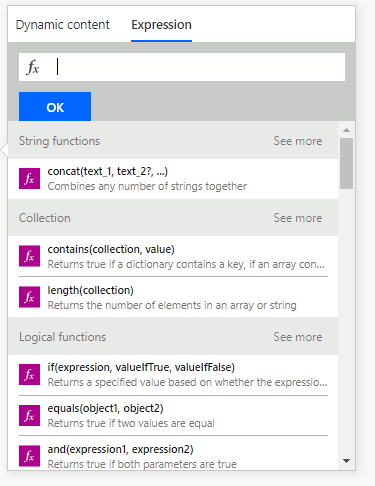
Have you ever wondered why the Expression box in Microsoft Flow is so small?

Low code expressions

It is because Flow is a low code product and low code means that we don’t need much code. Often a one liner can do the job.

Sometimes it is the small things in power Automate that make it difficult to get the job done! In this post I’m looking at 10 one-line expressions that can help. Most of these on liners will fit in that small expression box.

Expression 1 – Get your workflow run URL

This is one of my favourites that couldn’t miss from this list. Once you created a compose action and set this to

workflow()

Then you can use the following expression to build the url of the current run of the flow.

concat('https://unitedkingdom.flow.microsoft.com/manage/environments/',
 outputs('Compose')['tags']['environmentName'],
 '/flows/',
 outputs('Compose')['name'],
 '/runs/',
 outputs('Compose')['run']['name'])

For more details see my post about finding your run Url.

The above should still redirect however if you want to construct the new flow run URL then you could include the following directly into you send an email action.

https://make.powerautomate.com/environments/@{workflow().tags.environmentName}/flows/@{workflow().id}/runs/@{workflow().run.name}

Expression 2 – Format your dates

Formatting dates is easy in Power Automate

formatDateTime(utcNow(), 'yyyy-MM-dd')

Also see How to find your overdue tasks?

Expression 3 – Get the last X characters from a text

Getting the first X characters is easy using the substring function. The last X characters is slightly harder especially if you don’t know how long the text is. The following expression is your answer:

substring(outputs('Compose'), sub(length(outputs('Compose')), 4),4)

Last 4 characters

Expression 4 – Get that space into a variable

When you set a variable to a space Flow will tell you that the value is empty. the following expression will help you set a variable to a space.

replace("X","X"," ")

Expression 5 – Fix those failing switches

When you use switches in Flow and the switch value is sometimes not set you will find that your flow will fail. If you use the coalesce function you can make sure that you always get a value from a variable or action output. Even if the variable or output isn’t set.

Coalesce function

coalesce(triggerBody()?['Choice']?['Value'],'Unknown')

For more information see Improve your switches.

Expression 6 – Compare those texts

How often do you need to check the value of a text variable or output. A while back I was looking at the extensions of a file name

The below expression returned false:

equals('Pdf', 'PDF')

In the above example I used variables, but for simplicity sake I’m using hard coded strings. To solve my problems I used the toUpper fuction:

equals(toUpper('Pdf'), toUpper('PDF'))

Expression 7 – Have you got any great expressions?

The last expression spot in this post is still available. Have you used any great expressions? Please leave you useful one liners in the comments below.

Is your business still running on paper trails, sprawling Excel files, or ageing Access databases? There’s a better way — and I can show you exactly what it looks like. I’m the Technical Director of Vantage 365, a Microsoft solutions consultancy working with clients across the UK, the Netherlands, and worldwide. For over 30 years I’ve been turning messy, manual business processes into clean, automated systems that save time, reduce errors, and give teams the visibility they need to make better decisions. SharePains is not just any blog run by a Microsoft MVP. Have you ever used Try-Catch in Power Automate? The original post about Try-Catch in Power Automate can still be found on this site, https://staging.sharepains.com/2018/02/07/try-catch-finally-in-power-automate-flow/ Or have you ever used the Pieter’s method to avoid variables and speed up your flows? https://staging.sharepains.com/2020/03/11/pieters-method-for-advanced-in-flows/ You can contact me using contact@staging.sharepains.com

29 responses to “7 one line expressions that could help you in Power Automate”

  1. Harsh Avatar
    Harsh

    Please give expression to parse something from the string ..
    Example to grep some word from body line of email

    1. Pieter Veenstra Avatar

      It would very much depend on the kind of data you would want to extract and the format of the email. I’m not sure that I could give you simply expression for this. You could of course create an Azure function that does the work for you using regular expressions. Then call this function from a flow.

  2. Michael Avatar
    Michael

    What ist the best way to handly long expressions? Using a text editor? Is there an editor with intelliSense?

    1. Pieter Veenstra Avatar

      Have you used the new editor yet? The new expression editor is a lot better. You will need to enable the experimental features

      1. Michael Avatar

        No I had not. Yes, now there is IntelliSense, and the input field is bigger! Cool. Thank you!

  3. Chinama Silupumbwe Avatar

    I used coalesce(triggerBody()?[‘Stage’],’value’) yet does not display the value from the list but displays the word value in the email notification.Please help
    My Stage column is a Choice data type

    1. Pieter Veenstra Avatar

      Hi Chinama,

      You will find that in your case the triggerBody()?[‘Stage’] isn’t a null value. Most likely You will get something like []. Is your Choice field a multi select choice or is it a single choice?

  4. Jon Zaid Avatar

    Hi Pieter.

    Great insights and info.
    This is sort of a one-liner. I use SELECT to sanitize a string:
    The below expression will create an array of characters from the string which are alphanumeric, including “-“,’/”,”\” and space.

    To get it back to a string I join this output with a ‘#’ and then replace ‘#’ with ”

    (OK. it’s a three liner)

    SELECT
    From: range(0, length(variables(‘invoiceNo’)))
    Map: if(
    or (
    or (
    or(
    or(
    or (
    or(
    and(greaterOrEquals(substring(variables(‘invoiceNo’), item(), 1),’a’),lessOrEquals(substring(variables(‘invoiceNo’), item(), 1),’z’)),
    and(greaterOrEquals(substring(variables(‘invoiceNo’), item(), 1),’A’),lessOrEquals(substring(variables(‘invoiceNo’), item(), 1),’Z’))
    ),
    and(greaterOrEquals(substring(variables(‘invoiceNo’), item(), 1),’0?),lessOrEquals(substring(variables(‘invoiceNo’), item(), 1),’9?))
    ),
    equals(substring(variables(‘invoiceNo’), item(), 1),’-‘)
    ),
    equals(substring(variables(‘invoiceNo’), item(), 1),’ ‘)
    ),
    equals(substring(variables(‘invoiceNo’), item(), 1),’\’)
    ),
    equals(substring(variables(‘invoiceNo’), item(), 1),’/’)
    )
    ,substring(variables(‘invoiceNo’), item(), 1),”)

    1. Pieter Veenstra Avatar

      Hi Jon, great expression. I wonder is a split could reduce the repeated greateorequals, substring, variables expression a bit.

  5. Jon Zaid Avatar

    I’m not an expert on this, so not sure how the split could work into this? I would have to split on the acceptable chars? I really didn’t want to split the whole array and then loop char by char, as we know in Power Automate/Flow, iteration is not a strong point.

  6. Mike Smith Avatar
    Mike Smith

    How do I get the Error Details when a flow fails, so I can send those details back to the submitter of the flow.
    For instance, I’m trying to set the permissions to a document to read only, but the FLOW errors our because the document is locked for shared use by a user xxx. I can see that error if I look at the error details of the failed FLOW, but I want to email that error on the FLOW Failure.

  7. Paul W Avatar
    Paul W

    Useful article. Thanks.
    I get an invalid expression on the long workflow() expression. even after correcting the quotes and removing the linefeeds. Any thoughts?

    concat(‘https://unitedkingdom.flow.microsoft.com/manage/environments/’,outputs(‘Compose’)[‘tags’][‘environmentName’],
    ‘/flows/’,outputs(‘Compose’)[‘name’],
    ‘/runs/’,outputs(‘Compose’)[‘run’][‘name’])

    1. Pieter Veenstra Avatar

      can you add a ? between the ) and [

  8. Ohalev Avatar
    Ohalev

    Hi Pieter,
    Can I use a flow to manually generate an approval URL for a specific approver (in order to manually or automatically send them a reminder email)?
    I tried using the many Workflow() arguments and tags you listed above, but couldn’t identify the exact ones.

    On the out of the box Approval Flow actionable emails the URL looks something like:https://flow.microsoft.com/manage/environments/*environmentName*/approvals/received/*36 chars ID*/requests/*another 36 chars ID*

    I have tried many combinations, but none of them lead directly to the specific approval, the last two IDs are always different, for example:

    concat(‘https://flow.microsoft.com/manage/environments/’, outputs(‘Compose_Workflow’)[‘tags’][‘environmentName’], ‘/approvals/received/’,outputs(‘Compose_Workflow’)[‘name’],’/requests/’,outputs(‘Compose_Workflow’)[‘run’][‘name’])

    1. Pieter Veenstra Avatar

      You can probably get those id out of the action that was used to create the approval request or from the dataverse database.

      1. Ohalev Avatar
        Ohalev

        Thanks for the quick reply!
        I assume that in a “Start and Wait for Approval” flow I will have access to the action that was used to create the approval only after the approval is complete?

      2. Pieter Veenstra Avatar

        It is better to use the separate start and wait actions

  9. Was Wat Avatar
    Was Wat

    How can I insert TEAMSCHANNEL#0 string into Send an HTTP request to SharePoint as api filter? I am trying to filter sites based on filter. It throws error and does not catch # onwards.

    1. Pieter Veenstra Avatar

      Have you tried escaping the # either by using ## or\#

  10. Was Wat Avatar
    Was Wat

    That did help, thanks.

  11. Carol Shahan Avatar
    Carol Shahan

    I am trying to see if there is a match between two people based on Region. First person lists “North America;Asia Pacific”. Second person lists “North America;Latin America”. these are coming from an Excel sheet (created from a form). I think I need to put each list of regions into an array and compare the individual items but not sure how to break them up. Is there a command that is the opposite of Concat?

    1. Pieter Veenstra Avatar

      Hi Carol,

      I think that you are looking for the split function.

  12. romelwelltechguamcom Avatar

    When using item().date_column by itself it return the date value. But when I used it on an expression like formatDateTime(item().date_column,’M/d/yyyy’) returns empty string ”

    1. Pieter Veenstra Avatar

      Is date_column a date time column or is this a text column with a date in it?

  13. Tony Harris Avatar
    Tony Harris

    So for this expression, where the column name in Excel is WP #, would i use the follwing? as i doesn’t seem to work.

    if(equals(item()?[‘WP \#’],”),null,item()?[‘WP \#’])
    or could i try
    if(equals(item()?[‘WP ##’],’N/A’),null,item()?[‘WP ##’])

    1. Pieter Veenstra Avatar

      Hi Tony,

      I just quickly tried this out myself and Power Automate will accept the following:

      item()?[‘WP _x0023_’]

      So could you try:

      if(equals(item()?[‘WP _x0023_’],”),null,item()?[‘WP _x0023_’])

  14. jrwarwick Avatar

    _Convert a date into UNIX Epoch_

    div(sub(ticks(__TARGET_DATE__), ticks(‘1970-01-01Z00:00:00’)), 10000000) # sec since epoch (classical)
    div(sub(ticks(__TARGET_DATE__), ticks(‘1970-01-01Z00:00:00’)), 10000) # millisec since epoch (“modern”)

    e.g., for the date 60 days ago:

    div(sub(ticks(addDays(utcNow(), -60)), ticks(‘1970-01-01Z00:00:00’)), 10000000) #sec since epoch (classical)
    div(sub(ticks(addDays(utcNow(), -60)), ticks(‘1970-01-01Z00:00:00’)), 10000) #millisec since epoch (“modern”)

    _Convert UNIX Epoch back to a real date_

    addSeconds(‘1970-01-01Z00:00:00’, __TARGET_MILLISEC_SINCE_EPOCH__, ‘yyyy-MM-dd’)
    addSeconds(‘1970-01-01Z00:00:00’, div(__TARGET_MILLISEC_SINCE_EPOCH__,1000), ‘yyyy-MM-dd’)

    _UTC and Local quasi-timestamp/sequence: yyyyMMddHHmmss_

    formatDateTime(utcNow(),’yyyyMMddHHmmss’)

    I like to use that one for a (non-concurrently-triggered) processes inside a compose that can be a kind of batch-id/serial-number that you can pass around to children flows to keep chains of execution easily linked and logged.

    _Get Last Saturday_
    addDays(formatDateTime(utcNow(),’MM-dd-yyyy’),add(dayOfWeek(formatDateTime(utcNow(),’MM-dd-yyyy’)),-9))

    1. Pieter Veenstra Avatar

      Hi Justin,

      Those are some great expressions!

Leave a Reply

This site uses Akismet to reduce spam. Learn how your comment data is processed.