The Switch is one of the steps in Power Automate that can cause a lot of failures. And it might not always be clear why things are going wrong.
The Switch
In this post I’m going to have a look at the Switch step and how we can use the coalesce function in switch steps. Coalesce is one of those functions that is really useful, but it is often forgotten about.
Before I have a look at coalesce, I will first have a look at the switch in more detail.
For this example, I created a list with a choice field. Now the typical usage of a choice field is that you give users a choice out of many choices that they can select. In this case however, the field is not mandatory and therefore it could be left blank.
The flow that I created in Power Automate triggers on the creation of a new item and a switch that responds to my choice field. Different branches of my flow will run depending on the choice selected by the user.

Then I created a new list item and selected Choice 1 as my value for my choice field. This now mean that my switch step will run the branch relevant to the Choice 1 that was selected when the item was created in SharePoint.
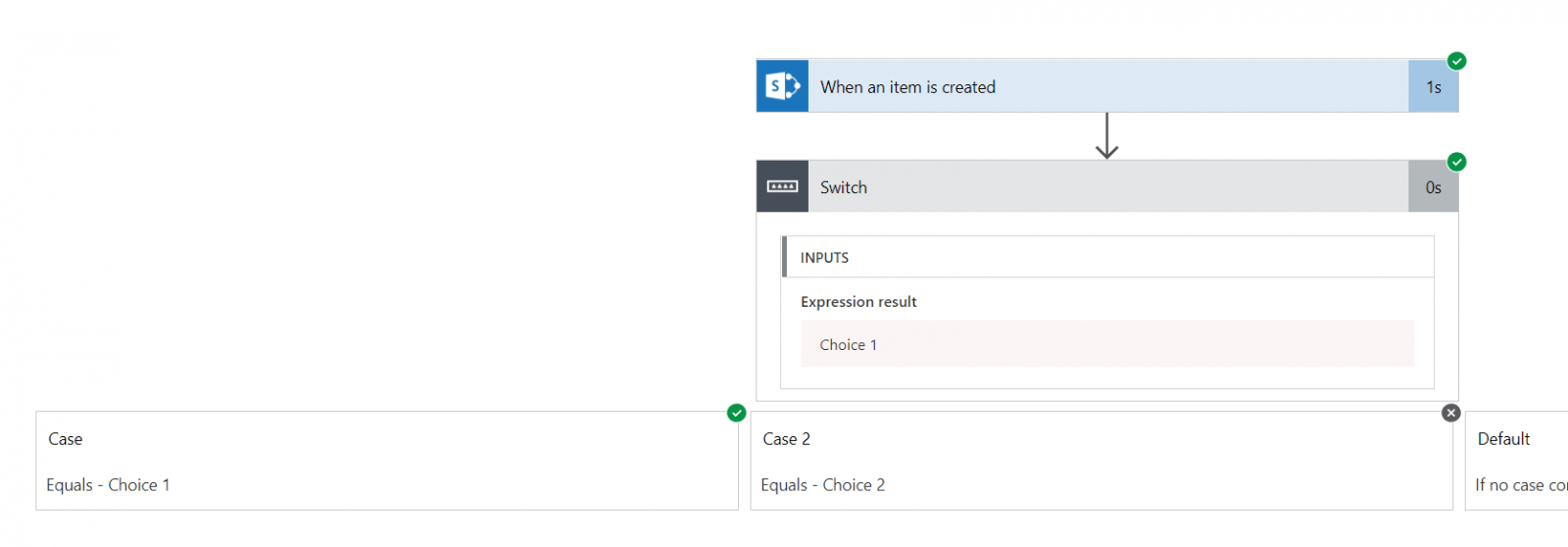
All good so far, but now what happens if you don’t select anything and the choice field remains empty. You might expect (or hope) that the default branch is followed. It would make sense for the default branch to run as none of the other branches match.
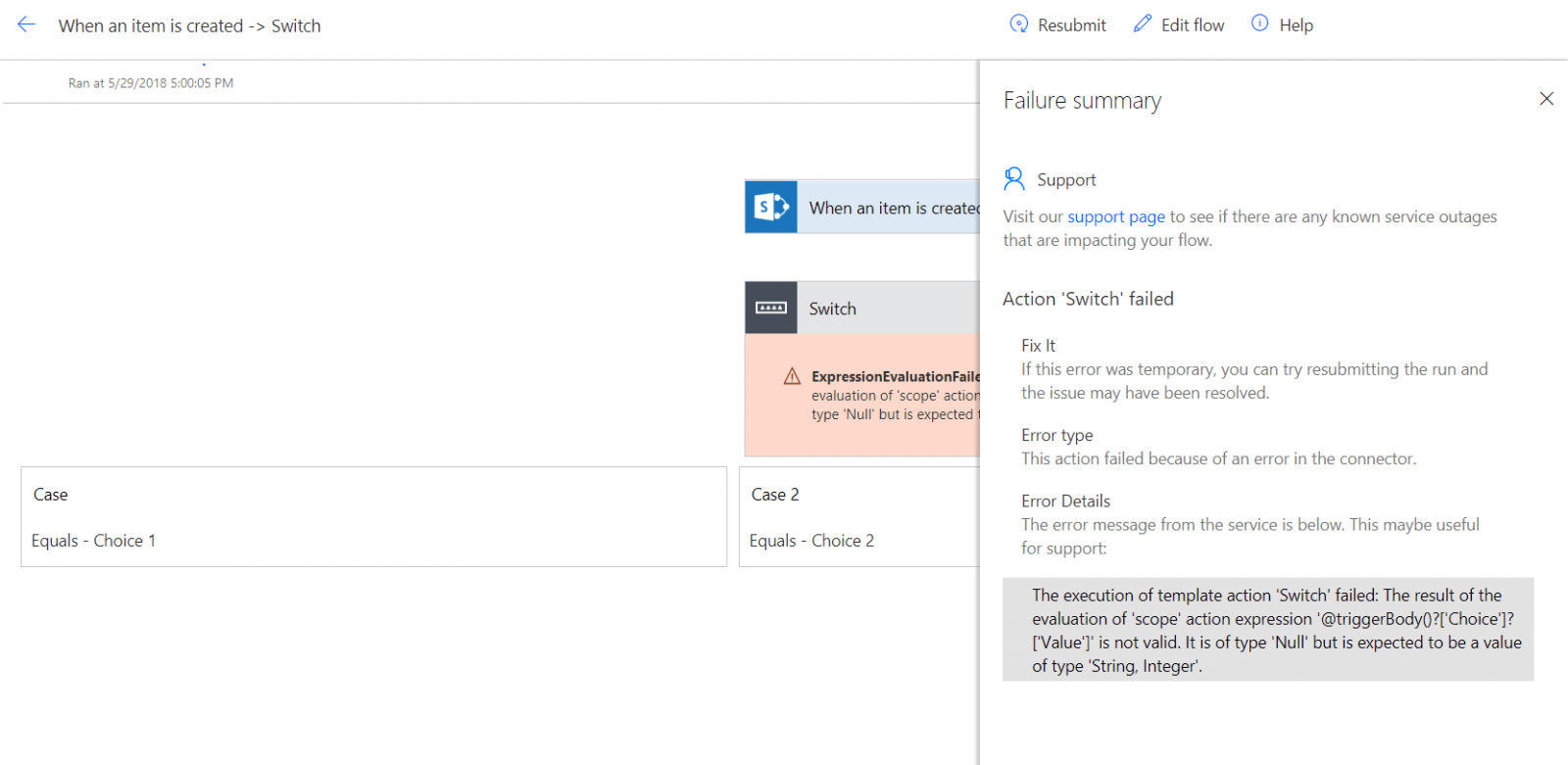
But that is not the case. Your flow will fail with an ugly error message:
The execution of template action ‘Switch’ failed: The result of the evaluation of ‘scope’ action expression ‘@triggerBody()?[‘Choice’]?[‘Value’]’ is not valid. It is of type ‘Null’ but is expected to be a value of type ‘String, Integer’.
The problem here is not that the value isn’t listed in any of my branches but the switch step will only accept either numbers or text as the values used to decide which branch needs to run.
An empty value doesn’t match the type of the other branches, hence the Switch is reporting the error above.
One way to get around this is to check before the switch if the choice field has been set or not and then run the switch only when it is set. If this is your approach then, have you noticed that your flows become large? Many of these condition steps just make flows difficult to understand.
There is a better way around this.
The Coalesce function
Within the switch step don’t use the Choice Value, but use the Choice value inside a coalesce function. So that means that your expression in the switch should look something like this:
coalesce(triggerBody()?['Choice']?['Value'],'Unknown')The Coalesce function will return either the value of the Choice or if that is not set, ‘Unknown’ will be returned. If you happen to have a switch that uses numbers, like 1, 2, 3 then you could decide to return -1 as a default instead of unknown. As long as the type of the default value matches the other possible values your flow should be ok.

And now your flow runs without failure (Well at least your switch doesn’t fall over!)

Other Switch Posts
When you would like to know more about switch steps, have a read through my post about Large switches with more than 25 options
FAQs
What is the coalesce function used for in Power Automate?
Coalesce is typically used to handle null values where null values aren’t expected. Using the coalesce function in Switch steps is often a good idea.
Pieter Veenstra

Is your business still running on paper trails, sprawling Excel files, or ageing Access databases? There’s a better way — and I can show you exactly what it looks like. I’m the Technical Director of Vantage 365, a Microsoft solutions consultancy working with clients across the UK, the Netherlands, and worldwide. For over 30 years I’ve been turning messy, manual business processes into clean, automated systems that save time, reduce errors, and give teams the visibility they need to make better decisions. SharePains is not just any blog run by a Microsoft MVP. Have you ever used Try-Catch in Power Automate? The original post about Try-Catch in Power Automate can still be found on this site, https://staging.sharepains.com/2018/02/07/try-catch-finally-in-power-automate-flow/ Or have you ever used the Pieter’s method to avoid variables and speed up your flows? https://staging.sharepains.com/2020/03/11/pieters-method-for-advanced-in-flows/ You can contact me using contact@staging.sharepains.com


Leave a Reply
You must be logged in to post a comment.