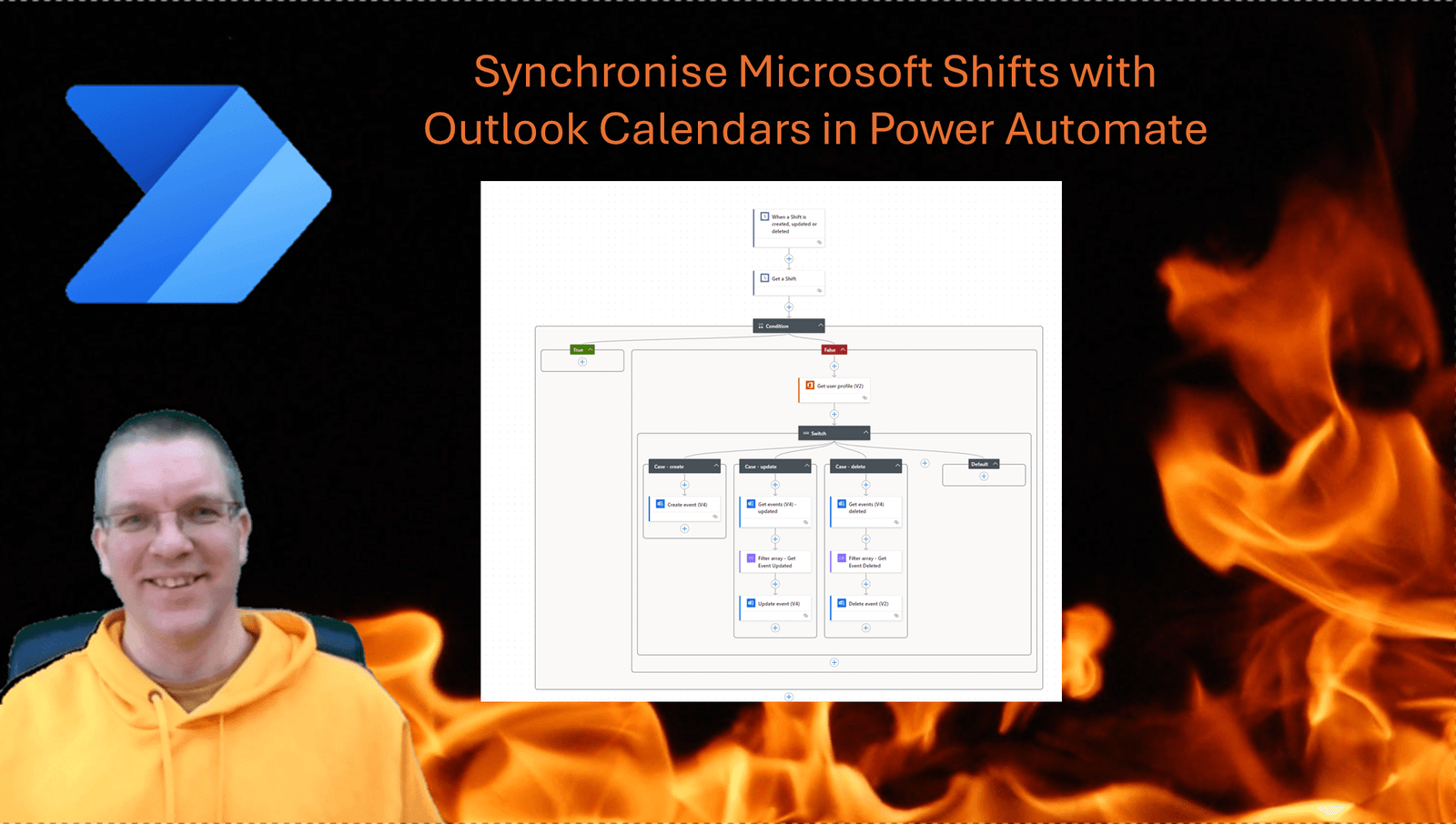
Synchronise Microsoft Shifts with Outlook Calendars in Power Automate the 2026 way

Synchronise Microsoft Shifts with Outlook Calendars in Power Automate

Synchronise Microsoft Shifts with Outlook Calendars in Power Automate the 2026 way

By:

Date:

I’ve been planning to rewrite my Synchronise Microsoft Shifts with Outlook Calendars in Power Automate post for quite a while. This post will give you the new and more efficient way of implementing a synchronisation process between Shifts and Outlook.

Setup of Microsoft Shifts

If you want to download the solution described in this post please find the download link at the end of this post.

In Microsoft Teams I’ve added the Shifts app and I’ve added a number of shifts. But users may not go to shifts as they will not get alerted when a new shift is planned in.
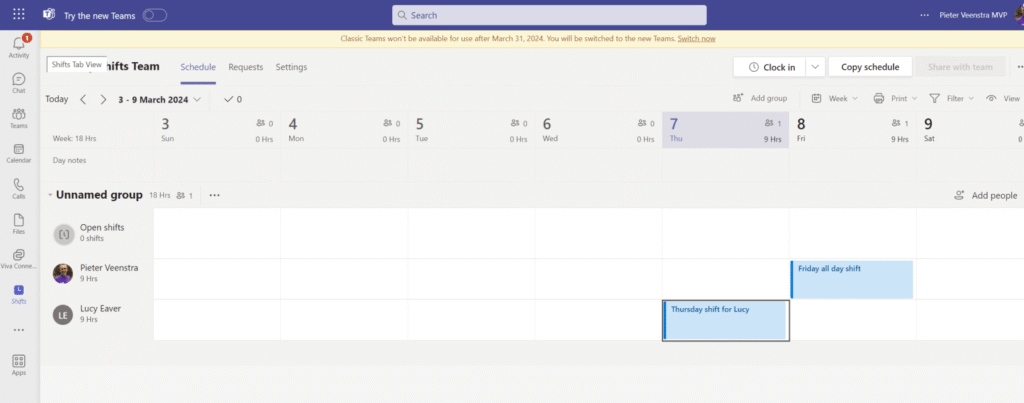
Microsoft Shifts with a few shifts scheduled

The need for synchronising shifts with Outlook Calendars has been a common one. In my earlier mentioned post many people for some help implementing the process. In this post the easy steps for you to build this process. If you need any help then feel free to open a chat of course.

In this post I will share the base process. To use this in a production environment you might want to add some error handling and some other small improvements. But as a base process the described flow will work.

Create the flow to synchronise Microsoft Shifts with Outlook Calendars

The process that we are going to create is best run using an account specific for resource scheduling. This account will need to have an Outlook Calendar so that invites can be added to that calendar and any Shift owners can be invited to those events.

I’m going to start with the When a shift is created, updated or deleted trigger. In the past I has to use a scheduled flow. This meant that ever so often calendars would be updated. Now the updates is near instant. This of course is a great improvement.
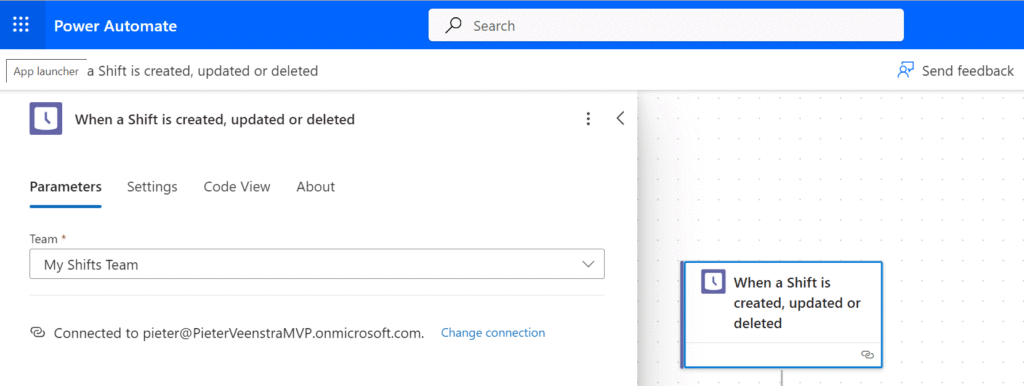
A trigger on shifts that will start the process on deletion, addition and updates of shifts.

Within the trigger settings you will need to select the team that is hosting your Shifts.

Synchronise Microsoft Shifts with Outlook Calendars in Power Automate the 2026 way

Get the Shift details

The above mentioned trigger will start our flow and give us some basic details about the shift that triggered our flow. however the majority of the details will need to be collected with a different action.

We get get the shift details using the Get a shift action.

Get the Shift details after a flow is triggered

This Shift ID can be selected form the Dynamic content or by using the following expression:

triggerOutputs()?['body/resourceData/id']

Shared shifts

In Microsoft shifts you can create a shift and once you are happy with it you have to share it with the rest of the team. A Get a shift action will supply a different structure of the data depending on if a shift has been shared or not.

In this flow I’m only going to handle Shared Shifts. We could of course also look at synchronising saves shifts and maybe make them appear in a different colour in outlook.

Check if there are any shift details found

This condition uses two expressions:

outputs('Get_a_Shift')?['body/sharedShift']

and

null

The True branch of the above condition will remain empty. This is where we could implement the process around saved Shifts.

Get the assignee

In the False Branch we are going to get the user profile of the user who is assigned to the shift. We need this user to send an invite to.

Get User Profile in the false branch

The Get user profile action will take the assignee from the Get a Shift action that we added earlier.

You can either select this user form the Dynamic content or use the following expression

outputs('Get_a_Shift')?['body/userId']
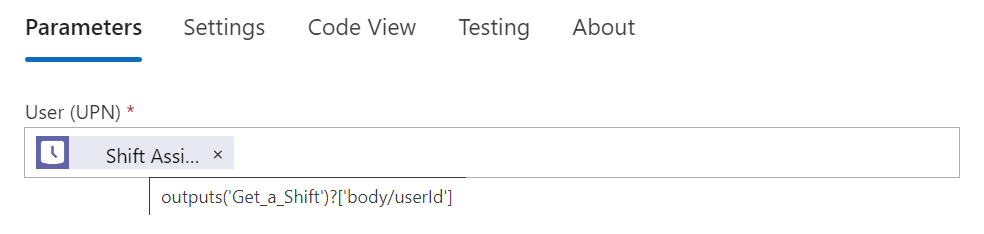
Get the user id from the shift

Create, Update and Delete events

As Shifts are Created, Updated and Deleted, we will need to flow into a different branch of a switch step.

The Switch Step works on the following expression, but you can also select this form Dynamic content of course.

triggerOutputs()?['body/changeType']
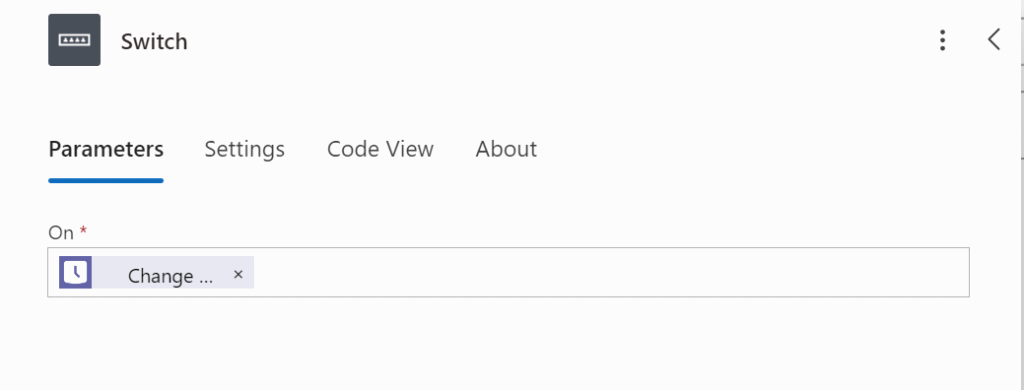
A switch on the addition, update or deletion of a shift.

Now you need to create 3 branches for the Switch. Set the values of the branches to

  • created
  • updated
  • deleted
Synchronise Microsoft Shifts with Outlook Calendars in Power Automate the 2026 way

Create Event

The Create event branch is the easiest of the three branches.

We Add a Create event(V4) action and select a Calendar that we ant to use to maintain all events. You might want to use an environment Variable for this. So that deployment form Dev -> Test -> Production is easier.

Then The Subject is set to the displayName of the Shift.

outputs('Get_a_Shift')?['body/sharedShift/displayName']
Create event for a shift

The Start and End Time properties are slightly tougher. Please have a look at my formatDateTime post for more details. The two expressions used are:

formatdatetime(outputs('Get_a_Shift')?['body/sharedShift/startDateTime'], 'yyyy-MM-ddTHH:mm:00')

formatdatetime(outputs('Get_a_Shift')?['body/sharedShift/endDateTime'], 'yyyy-MM-ddTHH:mm:00')

Notice that the Hours in the formatting are HH rather than hh. This is to ensure that we have a 24 hour clock.

Then the only thing left is the Required Attendees. This is where we get the Mail property form the earlier configured Get User Profile action.
Synchronise Microsoft Shifts with Outlook Calendars in Power Automate the 2026 way

That is the creation of the events done.

Update Events

Now the update events is slightly tricky. The filtering in the Get events(V4) action doesn’t work very well. Hence I’m collecting all the events ( by default this gives only events in the future. So that is fine for now.
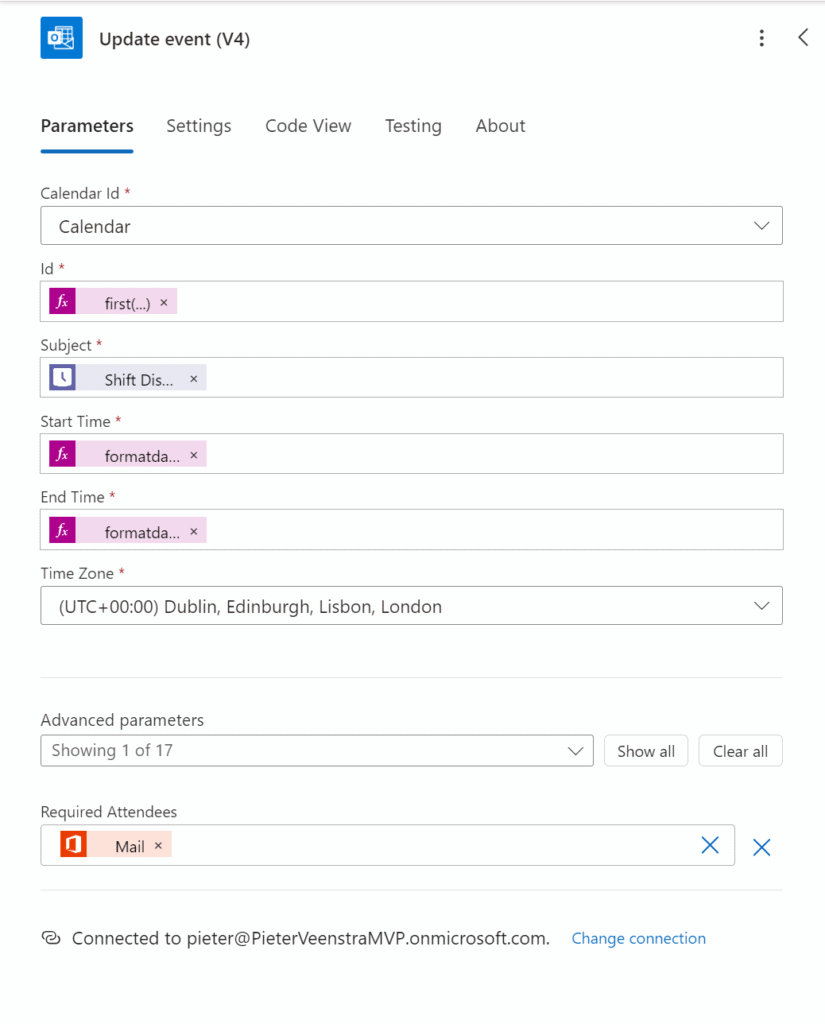
Synchronise Microsoft shifts Update event

Then The Filter Array action takes all the items from the Get Events and uses the following filter expression:

and(equals(item()?['start'], 
formatDateTime(outputs('Get_a_Shift')?['body/sharedShift/startDateTime'],
'yyyy-MM-ddTHH:mm:00.0000000')),
equals(item()?['end'],
formatDateTime(outputs('Get_a_Shift')?['body/sharedShift/endDateTime'],
'yyyy-MM-ddTHH:mm:00.0000000')
))

And then the Update event is pretty much the same as the create event action that we configured earlier. With the Id set tot he following expression:

first(outputs('Filter_Array_-_Get_Event_Updated')?['body'])?['Id']

This should now result in the Updated branch look like this:

Synchronise Microsoft Shifts with Outlook Calendars in Power Automate the 2026 way

Time zones within this solution

Now one important issue that has been in the download for a while is that when you are not living in the UTC time zone, the events in outlook are created at the wrong time.

To fix this please update the Create Event and Update events with the UTC time zone.
Synchronise Microsoft Shifts with Outlook Calendars in Power Automate the 2026 way

Delete Event

The delete Event branch is similar to the update branch. The only difference is that we replace the Update event with and Delete Event action.
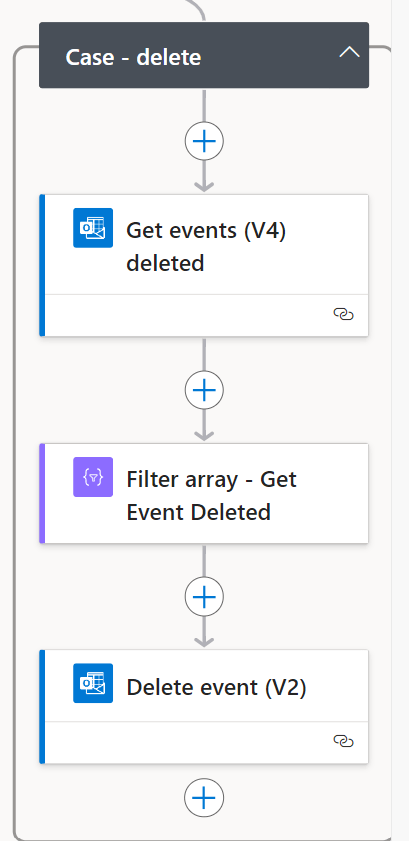
Synchronise Microsoft shifts Case - Delete
Synchronise Microsoft shifts Case – Delete

The 3 branches for create update and delete events, should now look like this:

Synchronise Microsoft Shifts with Outlook Calendars in Power Automate the 2026 way

And that is the whole process. Compared to the old process from a few years ago, this is now a lot simpler. The main reason for this is the addition of the trigger that we used in this flow

Handling Draft and Shared Shifts

Now to handle Shared shifts and Draft shifts in Microsoft shifts we need to make some more changes to the above flow.

Synchronise Microsoft Shifts with Outlook Calendars in Power Automate the 2026 way

To download the full solution please click on the link below:

Is there no option in Microsoft Shifts to Synchronise with my Outlook Calendar?

Microsoft Shift has indeed no option to synchronise your shifts to Outlook. To solve this issue you can use the downloadable solution available in this article: https://staging.sharepains.com/2024/03/07/synchronise-microsoft-shifts-outlook-calendars

FAQs

How can I copy my existing Shifts to Outlook

This post handles new shifts only, however the post referenced in the article could be used to get to the existing Shifts.

How do I install the download available in this post?

Visit make.powerapps.com and then click on solutions in the menu. Then import the downloaded solution to sync Microsoft Shifts with outlook.

Is your business still running on paper trails, sprawling Excel files, or ageing Access databases? There’s a better way — and I can show you exactly what it looks like. I’m the Technical Director of Vantage 365, a Microsoft solutions consultancy working with clients across the UK, the Netherlands, and worldwide. For over 30 years I’ve been turning messy, manual business processes into clean, automated systems that save time, reduce errors, and give teams the visibility they need to make better decisions. SharePains is not just any blog run by a Microsoft MVP. Have you ever used Try-Catch in Power Automate? The original post about Try-Catch in Power Automate can still be found on this site, https://staging.sharepains.com/2018/02/07/try-catch-finally-in-power-automate-flow/ Or have you ever used the Pieter’s method to avoid variables and speed up your flows? https://staging.sharepains.com/2020/03/11/pieters-method-for-advanced-in-flows/ You can contact me using contact@staging.sharepains.com

62 responses to “Synchronise Microsoft Shifts with Outlook Calendars in Power Automate the 2026 way”

  1. M.V. Avatar
    M.V.

    Hello Pieter. What is happening in “Update Events” step and why do you use “Get items” from SharePoint site? Is it possible to do the filtering without Sharepoint-Step?

    1. Pieter Veenstra Avatar

      I have had some nightmares with the images on SharePains recently. Not sure what happened there. I will get that fixed.

    2. Pieter Veenstra Avatar

      It is all sorted for that post now. Thanks for letting me know.

  2. YSalah Avatar
    YSalah

    Hi!
    Sorry I’m very new to all this. Is there anyway you can upload the zip file so I can import the flow?

    1. Pieter Veenstra Avatar

      This flow wouldn’t be 100% production ready. I can send you an export but I would add a fee more things before it is completely ready.

      Please open a chat and we can discuss.

  3. M.V Avatar
    M.V

    Hey! Could you help me to improve your delete step? Your flows works good, it deletes the right shift, but it checks all other calendar and tries to find the shift in their calendar. This leads to massive fails and endless Loops. Could you help me to solve this problem? Same issue on update step. The filter condition can’t match, so it also results in endless loops for all calendars.

    1. Pieter Veenstra Avatar

      If you open a chat, then I’m happy to try and see where we can improve the flow.

  4. U Avatar
    U

    Hi Pieter,

    Thank you for your post! I appreciate the information, but I’m finding it a bit challenging to grasp the initial steps for setting up the entire environment and creating the flow. Since I’m new to implementing this (would be for personal use), could you provide a complete set of steps and recommend which apps to use? I’d really appreciate your guidance on this matter.

    Thank you!

    1. Pieter Veenstra Avatar

      If you open a chat then we can have a look at getting the flow to work for you.

  5. Brykyile Avatar
    Brykyile

    Hello Pieter,

    I am trying to follow the steps that you have laid out. Is there a more detailed version available at this time or are you still working on updating the document? Thank you.

    1. Pieter Veenstra Avatar

      Which part are you struggling with. Feel free to open up a chat and we can work and making this flow work for you.

  6. TW Avatar
    TW

    Hello Pieter! Thanks for this. Is it possible to get a screenshot of what the entire flow looks like from the designer view? I think I may have something out of order, and a screenshot of that would be great to see.

    1. Pieter Veenstra Avatar

      With the new designer that is a little bit difficult. If you need any help feel free to open a chat and I will try and help you.

  7. Pascal Avatar
    Pascal

    Hello Pieter,
    any Idea why the shift could not be found?
    Action ‘Get_a_Shift’ failed: {“error”:{“code”:”NotFound”,”message”:”Sorry, the shift was not found and may have been deleted”,”details”:[],”innererror”:{“code”:”ShiftNotFound”}}}

    1. Pieter Veenstra Avatar

      Hi Pascal,
      If you check your flow run most likely the shift id used to query the shifts is not set or incorrect. Can you send me a screenshot of the flow run step?

  8. Ewan Avatar
    Ewan

    Hi Pieter

    I’m not quite sure what to add in the parameters of the Switch. What exactly should be noted in there? Thanks for your reply.

    1. Pieter Veenstra Avatar

      Hi Ewan,

      you should have the following options:

      • created
      • updated
      • deleted
  9. Rudi Avatar
    Rudi

    Hi Pieter,
    is there a way to create this Flow for all team members without Power Automate Premium?
    Many thanks in advance!

    1. Pieter Veenstra Avatar

      There are no premium action in the flow in this post.

  10. Katie Avatar
    Katie

    Hello! I am trying to set up the filter array with the expressions: outputs(‘Get_Events_(V4)’)?[‘body/value’] for the From section and your provided code for the filter expression.

    Every time I try to run the code, I get the error “Flow save failed with code ‘WorkflowRunActionInputsInvalidProperty’ and message ‘The ‘inputs’ of workflow run action ‘Filter_array’ of type ‘Query’ is not valid. Property ‘where’ must be a template language expression.” along with errors with invalid expressions in input parameters of Condition and Switch. I was not getting these errors before when I tried to run without the Filter Array.

    I followed all the other steps before this. What should I do to fix this? Do I need to change the commands in the Filter Array?

    Thanks in advance!

    1. Pieter Veenstra Avatar

      It looks like your Filter array doesn’t have the right expression. If you open up a chat then I’m happy to have a look at this.

  11. PJ Avatar
    PJ

    Hey Pieter,

    Love the work you’ve done.
    When running the flow i have the following issue:

    Action ‘Update_event_(V4)’ failed: The ‘inputs.parameters’ of workflow operation ‘Update_event_(V4)’ of type ‘OpenApiConnection’ is not valid. Error details: The resolved string values for the following parameters are invalid, they may not be null or empty: ‘id’

    I have the Update Event (V4) ID set to:
    first(outputs(‘Filter_Array_-_Get_Event_Deleted’)?[‘body’])?[‘Id’]

    Would you be able to assist?

    Sincerely,
    PJ

    1. Pieter Veenstra Avatar

      Hi PJ,
      When you run the flow what does the Filter array action return?

  12. Ambuj Rai Avatar
    Ambuj Rai

    Hi, I’m getting this error :
    InvalidTemplate. Unable to process template language expressions in action ‘Create_event_(V4)’ inputs at line ‘0’ and column ‘0’: ‘The template language function ‘formatDateTime’ expects its first parameter to be of type string. The provided value is of type ‘Null’. Please see https://aka.ms/logicexpressions#formatdatetime for usage details.’.

    Will you able to help?

    1. Pieter Veenstra Avatar

      Is that with the downloaded version or the one following the steps? The downloaded version shouldn’t give that error.

  13. Ambuj Rai Avatar
    Ambuj Rai

    Do you have a setup for Time Off in the Shifts app? When we add a Time Off entry, it doesn’t sync to the calendar, and the flow doesn’t run.

    1. Pieter Veenstra Avatar

      Hi Ambuj, that would require a different flow as there is a specific trigger for time off requests in Shifts.

  14. JaSiMa LPs Avatar
    JaSiMa LPs

    Hi,
    is there also an option to run this flow in the background for every user and not only for me?
    So whenever I assign shifts, it automatically updates the calendar of 100+ people?

    1. Pieter Veenstra Avatar

      Hi , That is how this flow already works. If you run the flows as a service account, point it at a Shifts setup with many users and then send the events from the service account to other accounts then the events appear within everyone’s calendar and the service account remains as owner of the event so that deletion of events can be implemented as well.

  15. JaSiMa LPs Avatar
    JaSiMa LPs

    Hi Pieter,
    thanks for the reply. I just figured out while reading again.

  16. Per Ahlgren Avatar
    Per Ahlgren

    Hi Pieter,

    I have downloaded the file and obtained the zip library. I then tried to import it but without success, unfortunately, I don’t get a proper error message other than “Something went wrong. Please try again later.” I took the code into Visual Studio Code and tried to import it into Power Automate that way, but I get the error message “Missing ‘definition’ flow property” when I try to save. Can you help me?

    Per

    1. Pieter Veenstra Avatar

      Hi Per, Can you open a chat then I can have a look at sorting this out for you.

  17. Richy Avatar
    Richy

    I have an issue where the shift entry is always being detected as “Updated” in the very first step, even if its new shift being added.
    Have you seen this before Pieter?

    1. Pieter Veenstra Avatar

      Are you hitting save before publishing?

  18. Richy Avatar
    Richy

    Thank you Pieter, you pushed me in the right direct.
    Being slightly patient and allowing the “created” event to run first before publishing seems to have done the trick

  19. Richy Avatar
    Richy

    Hi Pieter,
    I have an issue with the .ZIP file you provided. Imported successfully (via PowerAutomate Solutions for anyone else reading) and updated values where required.
    When I create a draft, it created the calendar entry however when I publish it I get a duplicate entry.

    Any thoughts welcome.

    1. Pieter Veenstra Avatar

      I think that this is down to the draft flow being triggered when the shift is saved and then the shift is published. This triggers the flow again and will create the same outlook record again. The flow might require a bit more exception handling for it to be fully production ready.

  20. Richy Avatar
    Richy

    OK – Thank you. Amazing work

  21. Sever Alibazov Avatar

    Hi Pieter,
    First of all, very handy flow! Thank you very much!
    Though I have a slight issue with the Delete case, it doesn’t throw any errors, the flow runs fine, just when I delete a shift, it grabs the correct data along the flow until the “Condition-Found Deleted event”. As input, it receives a ‘false’ expression, and thus it doesn’t delete the shift from the calendar. But in the previous step (Filter array), the output shows that the correct data is passed through.
    I tried creating a separate flow without any conditions or triggers (When a Shift is created/updated/deleted -> Get Event -> Filter Array -> Delete event), it works (of course, with slight changes in the parameters).
    Any idea what might be causing it?
    Thanks!

    1. Pieter Veenstra Avatar

      Hi Sever,

      Can you check the start and end times of the events in Outlook and the Shifts in MS Shifts? Are they matching or is one time zone corrected and the other not?

  22. Christopher John Bowler Avatar
    Christopher John Bowler

    Whenever I create a shift it has the “Updated” change type, so it triggers the wrong branch of the flow. Any thoughts on how I prevent this behaviour?

    1. Pieter Veenstra Avatar

      Unless you change it that shouldn’t happen. Happy to do a Teams call to have a look if that helps.

  23. Fox Avatar

    I cannot upload the zip. I receive this error: Something went wrong. Please try again later.

    1. Pieter Veenstra Avatar

      I’ve just tried it and it worked. Could you try and download it again? During which part of the import process did you get the error?

      1. Fox Avatar

        Just tried again with a different computer too and it also failed. It fails at upload.

      2. Pieter Veenstra Avatar

        If you open a chat. We can have a look at doing a screenshare on Monday.

  24. Gijs Prins Avatar
    Gijs Prins

    Hi Pieter,

    You are jumping from the basic build to only a screenshot of the complete build with shared and drafts shifts. Now i’m having the same issue as someone mentioned here earlier: something went wrong error when i try to upload the file.
    It also seems that when you update/create a shift the flow triggers and then also when you share it. When you create multiple shifts it just seems to fail.

    1. Pieter Veenstra Avatar

      Hi Gijs, have you tried the download at the bottom of the post. It includes a few fixes and enhancements that I kept out of the post for simplicity reasons.

  25. Jörg Wiedekamp Avatar
    Jörg Wiedekamp

    Hi Pieter, thanks for the great solution. Unfortunately, I can’t import it. Could you please send me a screenshot of the entire solution? I’ll then try to recreate it.

    1. Pieter Veenstra Avatar

      Do you get any errors when you try to import the solution?

      1. jwiedekamp Avatar
        jwiedekamp

        Yes, I can send you the error message and the logfile.

  26. jwiedekamp Avatar
    jwiedekamp

    YES, I have an error message log. I can send it to you.

  27. jwiedekamp Avatar
    jwiedekamp

    What kind of action type is Shared Updated copy and Shared Updated? And what do they do? What is their function?

    1. Pieter Veenstra Avatar

      The are scope steps. Scope steps are a container that can hold multiple other steps. Quite often they are used for error handling. See also my post about the try catch pattern.

      The other reason is quite often to give a number of actions a name (the scope’s name) to self document the flow.

  28. Yram Olme Avatar
    Yram Olme

    Hello, I followed the steps, ran the tests and everything has indicated that my flow should be ready to go. However, when I create a new Shift and share it, it is not coming up on the calendar I have set up. Do you have any ideas on how to resolve this?

    1. Pieter Veenstra Avatar

      Did the flow get triggered at all? Or did it fail?

      If you open up a chat then we can have a look at setting up a Teams call to get you up and running.

  29. sumitjha99fd03d51e Avatar
    sumitjha99fd03d51e

    Hello Pieter,

    I have downloaded the zip file, uploaded it to Power Automate, and confirmed that it is working. However, when I create an event in the Shifts app, it sends an invite to accept. I wanted to check with you if this is expected behavior—does it always send an invite to add the calendar?

    Our requirement is that when we update Shifts in the Shifts app, it should automatically sync to the user’s Outlook calendar, including weekly offs and PTO. At present, I am not seeing this happen as intended. Could you please suggest how I can improve the flow so that it meets this requirement?

    1. Pieter Veenstra Avatar

      The way it works is better. Would you really want your flows to have access directly to all calendars? It would become a major security issue. This is why I would implement the flow using a service account so that the invites come from a single calendar.

      Alternatively you could create an app registration and implement a similar process where you write directly to everybody’s calendars. It will make the update process a lot more complicated and you would need to use the premium HTTP request action.

      1. sumitjha99fd03d51e Avatar
        sumitjha99fd03d51e

        Thank you for the detailed explanation, that makes sense.
        I understand why using a service account or an app registration is the recommended approach to avoid exposing individual calendars.

        I do have one follow?up question:
        I only need the Flow to update an existing Shift — not create or delete anything. The Flow works correctly when a Shift is created, but when I try to use the Update option it throws an error. Is there a way to configure the Flow so it only performs an update action without requiring create/delete permissions?

      2. Pieter Veenstra Avatar

        Hi Sumit,

        that probably means that the Shift ID isn’t found in the calendar where the flow is looking. The creation of an event means that an event is created with the Shift ID in the body. The update branch of the flow uses this Shift ID to link up the Event with the Shift

  30. bokkoman Avatar
    bokkoman

    I used this, but lately the Shift’s User ID is not coming through correctly, most of the times they are all linked to the same user. That means all my Shifts are not Synced since it the user ID is never mine.
    Is this something on my end or just a bug in Shifts?
    The planner here creates the shifts for a week and then publishes them. So then I get like 50 flows and none of them is for me, and it’s obviously wrong. Cause going through them one by one, I can see which one belongs to me, but the User ID is for someone else.

    1. Pieter Veenstra Avatar

      Hi Can you open a chat then we can organise a Teams chat and we can have a look at resolving this issue. Many organisations are using this flow but I’ve not seen any major issues reported recently.

Leave a Reply

This site uses Akismet to reduce spam. Learn how your comment data is processed.