For most developers the Try, Catch, Finally construction is a very common way of handling errors. Try Catch Finally in Power Automate has become a common pattern in recent years as well.
Try catch finally Power Automate
Like with other programming languages within Power Automate flows this try catch finally pattern is also possible.
Today I setup a flow with a manual start and 3 scopes. I renamed the scopes to Try, Catch and Finally as shown below.
This is the basic flow for the try catch finally in Power Automate flows, giving us the framework for every flow that we want to develop.
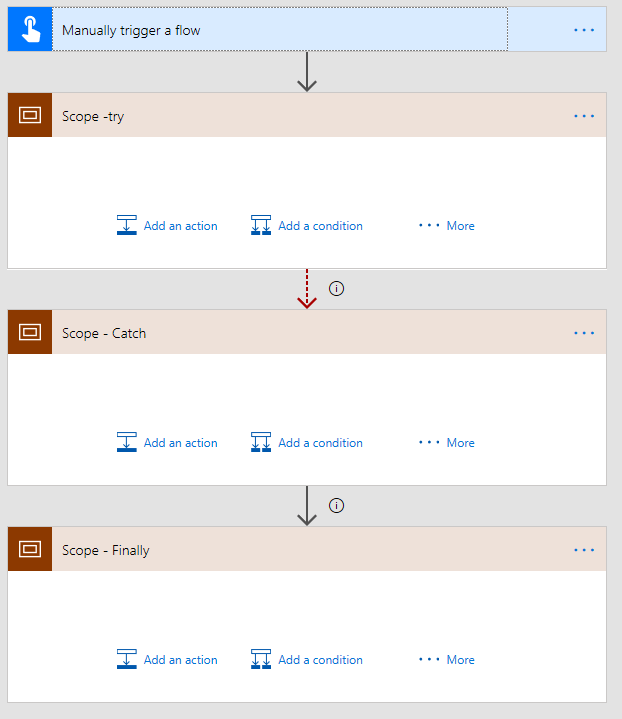
Try
In the try section I put all the actions that form my main process. The main process may fail anywhere, however I am not going to worry about these failures for now.
Handling exceptions for each action would become quite difficult t manage and it would clutter my flow in Power Automate. However if we moved some of the steps from a main flow into a child flow then, we could repeat the same try catch finally pattern in the child flows.
In this pattern I’m assuming that if any error does occur in the Try block of steps that we want to stop the flow and start the error handling part of the process.
Catch
Then for the Catch part of the try, catch and finally pattern I set the run after to has failed. This will result in the steps inside the catch step being run when something goes wrong inside the try section.
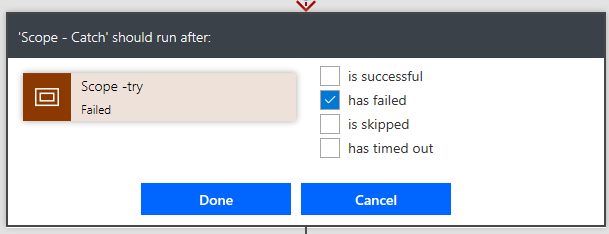
In the catch section I add all the failure handling code. This error handling could for example include sending an email with the URL of the flow run to the user that started the flow or maybe even log a support ticket.
The Url of the flow run could be constructed with the following code:
concat('https://unitedkingdom.flow.microsoft.com/manage/environments/',
 workflow()?['tags']['environmentName'],
 '/flows/', workflow()?['name'],
 '/runs/',
 workflow()?['run']['name'])
I described this in my Expression 1 of the post 7 one line expressions
The possibilities are endless. It is now up to you to find the ways to recover from the failures in your flows.
You could even consider restarting your flow in Power Automate if the flow fails because of an overload of you connector
Finally
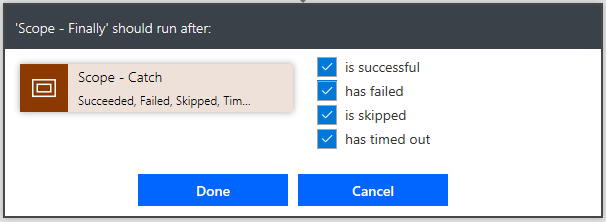
For the finally scope I ticked all the boxes in the the run after configuration
The only limitation to this solutions that I have found so far it that you can’t collect any exceptions that may be generated. Hopefully soon Microsoft Flow will give the option to collect exceptions.
The closest I’ve got so far with action level exception handling is described in my post Get the result of your failed actions in Power Automate. In this post I managed to get some error details using the result function. However if you planned to collect the error details of every action possible then you might end up with very large flows. I would not recommend that approach for larger flows.
For additional information, for example on how to collect the flow run URL and send it to the users or administrators see also, Microsoft Flow – You only need one template to get started. This post also gets you to the Flow template available in your tenant that you could use the implement the basic pattern.
More Power Automate Try Catch Finally post
Implementing a Try, Catch, Finally in Logic Apps
Retrying after failures in Microsoft Flow
FAQs
Should I always include try-catch-finally scopes in my flows?
For small flows (1 trigger and 1 action) it is possible to skip the try-catch-finally pattern and just configure the run after settings, however putting this pattern in place gives a strong solid structure to your flows
What is the best way to handle Errors in part of my flows?
By splitting your flows into smaller flows using child flows, you can follow the same try catch finally pattern as you would do with larger flows.
Pieter Veenstra

Is your business still running on paper trails, sprawling Excel files, or ageing Access databases? There’s a better way — and I can show you exactly what it looks like. I’m the Technical Director of Vantage 365, a Microsoft solutions consultancy working with clients across the UK, the Netherlands, and worldwide. For over 30 years I’ve been turning messy, manual business processes into clean, automated systems that save time, reduce errors, and give teams the visibility they need to make better decisions. SharePains is not just any blog run by a Microsoft MVP. Have you ever used Try-Catch in Power Automate? The original post about Try-Catch in Power Automate can still be found on this site, https://staging.sharepains.com/2018/02/07/try-catch-finally-in-power-automate-flow/ Or have you ever used the Pieter’s method to avoid variables and speed up your flows? https://staging.sharepains.com/2020/03/11/pieters-method-for-advanced-in-flows/ You can contact me using contact@staging.sharepains.com


Leave a Reply
You must be logged in to post a comment.