Cancel Flow Run instead of Terminate in the middle of an apply to each in Power Automate

Cancel Flow run

Cancel Flow Run instead of Terminate in the middle of an apply to each in Power Automate

By:

Date:

Have you tried using terminate in the middle of an apply to each? Did you get The operation terminate cannot be used inside a for each?
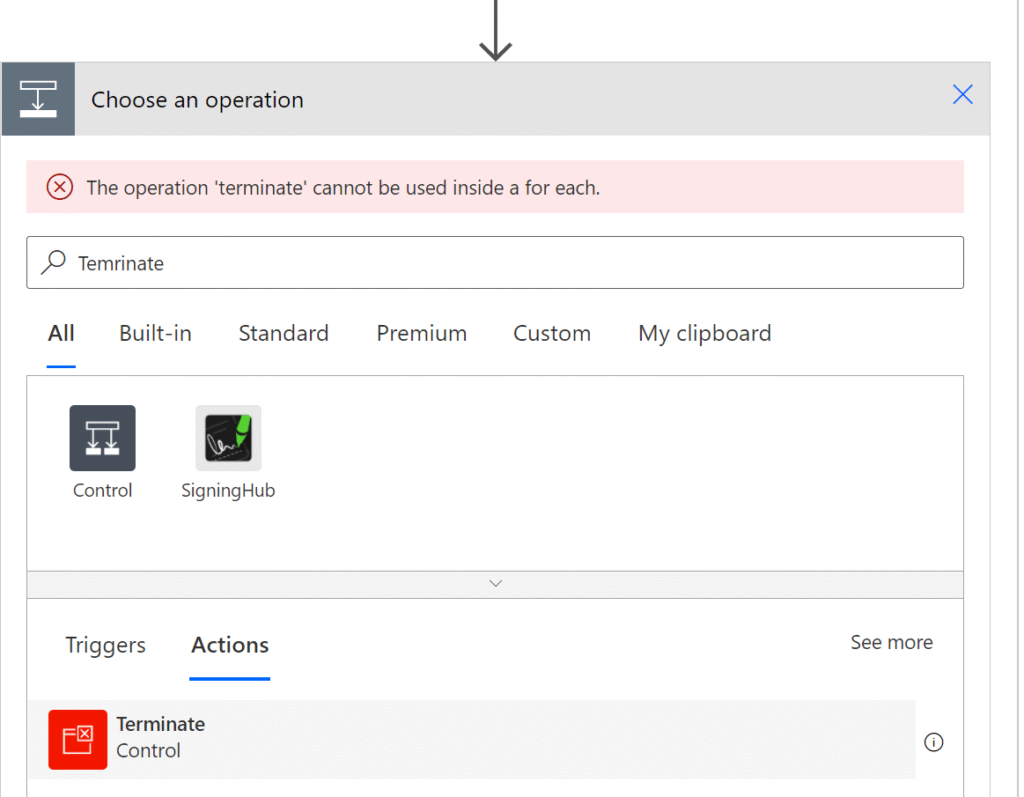
Cancel Flow Run instead of Terminate in the middle of an apply to each in Power Automate

Terminate

The terminate action is so often misused. As I mentioned a while back the terminate action should really not be used. But if you are inside an apply to each processing 1000s of records then cancelling out might be something that you want to do.

Cancel flow runs

There is now an option to cancel a flow run. As shown in the following example, I want to terminate my flow when the value of the item being processes is set to 4.

Cancel Flow Run

Using the Cancel Flow Run action you can now cancel your flow runs.

Yes, you could use this to cancel other flows( e.g. get a parent flow to cancel a child flow. Or the other way around. But you can also use this to cancel the current flow run.

Configure the cancel Flow Run action

To cancel the current run all we have to do is configure the actions as shown below:
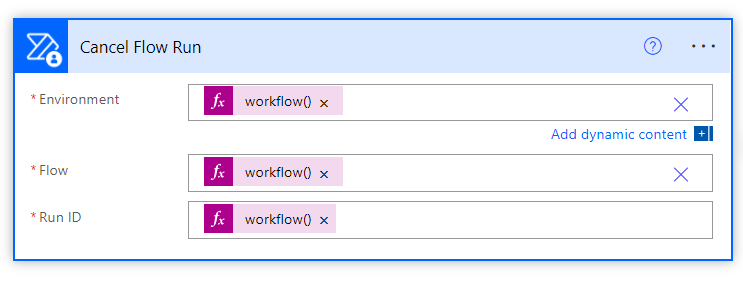
Cancel Flow Run action

For the Environment we can use:

workflow().tags.environmentName

For the Flow can use:

workflow().name

For the Run ID we can use:

workflow().run.name

So just with a few simple expressions, we can cancel the current flow run, even inside an apply to each or do until step.

Is your business still running on paper trails, sprawling Excel files, or ageing Access databases? There’s a better way — and I can show you exactly what it looks like. I’m the Technical Director of Vantage 365, a Microsoft solutions consultancy working with clients across the UK, the Netherlands, and worldwide. For over 30 years I’ve been turning messy, manual business processes into clean, automated systems that save time, reduce errors, and give teams the visibility they need to make better decisions. SharePains is not just any blog run by a Microsoft MVP. Have you ever used Try-Catch in Power Automate? The original post about Try-Catch in Power Automate can still be found on this site, https://staging.sharepains.com/2018/02/07/try-catch-finally-in-power-automate-flow/ Or have you ever used the Pieter’s method to avoid variables and speed up your flows? https://staging.sharepains.com/2020/03/11/pieters-method-for-advanced-in-flows/ You can contact me using contact@staging.sharepains.com

Tags:

12 responses to “Cancel Flow Run instead of Terminate in the middle of an apply to each in Power Automate”

  1. fff Avatar
    fff

    hello, what is the name of cancel flow run on power automate, I can’t find it when I type cancel flow run.

    1. Pieter Veenstra Avatar

      It is called “Cancel Flow Run”

  2. Bernard Vixseboxse Avatar
    Bernard Vixseboxse

    I also had problem finding it. Look for Power Automate Management first.

  3. Rachael Avatar
    Rachael

    Is this only an option for solution-aware flows?

    1. Pieter Veenstra Avatar

      No, it should work for all flows.

  4. Shaun Avatar
    Shaun

    After taking Bernard’s advice – and using Pieter’s guide… I cannot stress my gratitude for helping isolate trouble spots in large iterations. Thank you!! ~S

  5. Jacob Ularichard Avatar
    Jacob Ularichard

    It was very helpful, I’m so thankful bro

  6. nigelpwordpress Avatar

    Hi Pieter When you cancel the flow (which is the only way so far I have found to stop a Apply to Each) the flow has stopped but there are no results so you cannot see what lead up to the Stop. Regards Nigel

    1. Pieter Veenstra Avatar

      Hi Nigel,

      There is another way, but I wouldn’t recommend it for long running Apply to each steps.

      Have inside your apply to each a variable that is checked to be true or false and only run the steps inside the apply to each if this variable is set. Then set that variable instead of doing a terminate.

      That way your apply to each will not run any steps anymore and it will finish cleanly.

      Variables inside Apply to each steps however are a bad idea for performance reasons as you can’t run with higher concurrency than 1 as the variables are locking each instance of the apply to each.

      What you could do of course is use a record (in Dataverse or SharePoint) instead of a variable. Read this record and update the record instead of the terminate, but that will probably not perform very well either.

  7. Damien Avatar
    Damien

    HI. What are the access rights needed for this action “Cancel Flow run”? I used that technique, everything was ok until no admin users got an error (not allowed). It was used in an approval flow on SharePoint documents, users have collaborate and approve rights.

    1. Pieter Veenstra Avatar

      You would need premium licences to access the Dataverse records.

  8. Damien Avatar
    Damien

    Hi Pieter. Just to check my understanding : the “Cancel flow run” action should be called only from a power automate premium account? (in my opinion it is a major information 🙂 ) . If so, I think I will change the flow to be planified (and not running after user click) to run using an admin account.

Leave a Reply

This site uses Akismet to reduce spam. Learn how your comment data is processed.