
In Power Apps when you do a Patch to create a new item or to update an existing item you migth have found the error Object must implement IConvertible
Object must implement IConvertible
You have figured out how to use the Patch function but when you run the code you get the following error:
The requested operation is invalid. Server response: … failed: Object must implement IConvertible
Most low coders will think of a nice car without a roof now!
It’s time for another real SharePain as this high code error message in a low code platform will confuse many people.

Patch the wrong way
We need to have a more detailed look at the code here.
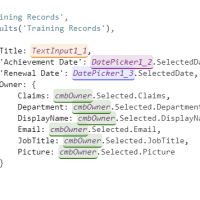
In my code the TextInput1_1 control is holding the data that I want to use to update my list item in SharePoint. it is so easy to just type the control name and assume that all is ok.
Patch(
    'Training Records',
    Defaults('Training Records'),
    {
        Title: TextInput1_1,
        ...
    }
)
But this is wrong, TextInput1_1 is a control and not a piece of string (aka text). To get to the data in the control TextInput1_1.Text will need to be used.
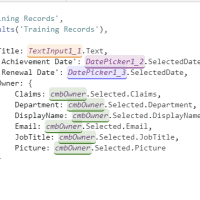
It is such an easy mistake to make, and such unclear error message to get.
Trying to understand the error message
Sorry we will have to go into coding language here. I’ve had a look around for an easy to understand explanation about IConvertible. From the referenced site I got:
Defines methods that convert the value of the implementing reference or value type to a common language runtime type that has an equivalent value.
Any clearer now?
I prefer the following:
Turn something complicated into something simple.
So taking “Object must implement IConvertible” back into Power Platform language:
The TextInput control returns information that cannot be used as a text, number or date value.
Wouldn’t it be nice if complicated and difficult to understand error messages were translated into something more human like?
Pieter Veenstra

Is your business still running on paper trails, sprawling Excel files, or ageing Access databases? There’s a better way — and I can show you exactly what it looks like. I’m the Technical Director of Vantage 365, a Microsoft solutions consultancy working with clients across the UK, the Netherlands, and worldwide. For over 30 years I’ve been turning messy, manual business processes into clean, automated systems that save time, reduce errors, and give teams the visibility they need to make better decisions. SharePains is not just any blog run by a Microsoft MVP. Have you ever used Try-Catch in Power Automate? The original post about Try-Catch in Power Automate can still be found on this site, https://staging.sharepains.com/2018/02/07/try-catch-finally-in-power-automate-flow/ Or have you ever used the Pieter’s method to avoid variables and speed up your flows? https://staging.sharepains.com/2020/03/11/pieters-method-for-advanced-in-flows/ You can contact me using contact@staging.sharepains.com


Leave a Reply
You must be logged in to post a comment.