
Create super fast joins of 2 arrays in Power Automate

creating joins

Create super fast joins of 2 arrays in Power Automate

By:

Date:

In my The advanced Pieter’s method in Power Automate post, I received a comment asking about joins when using json arrays.

The Data used

In this post I’ve assumed that you have read the above post.

As an example I have the following two arrays. Most likely you will find that your arrays are larger:

Array 1

[
 {"id":1,"data":2,"code":3},
 {"id":2,"data":3,"code":4},
 {"id":3,"data":4,"code":5}
]

and array 2:

[
 {"data":1,"thread":1},
 {"data":2,"thread":2},
 {"data":3,"thread":3},
 {"data":4,"thread":4}
]

The result needs to be as shown below:

[
 {"id":1,"data":2,"code":3,"thread":2},
 {"id":2,"data":3,"code":4,"thread":3},
 {"id":3,"data":4,"code":5,"thread":4}
]

Introduction to Joins

The world of data contains multiple types of joins

Looking at our data, then it looks like we have a left or an inner join. In our case data that exist in array 1 will always find a matching record in the second array. Looking at the definitions of the two join types, it looks like inner join is the one that seems most relevant.

The LEFT JOIN keyword returns all records from the left table (table1), and the matched records from the right table (table2). The result is NULL from the right side, if there is no match.

The INNER JOIN keyword selects records that have matching values in both tables.

Inner Joins in Power Automate

I’ve built the following flow. Note the speed at which this is running. Just 1 second.
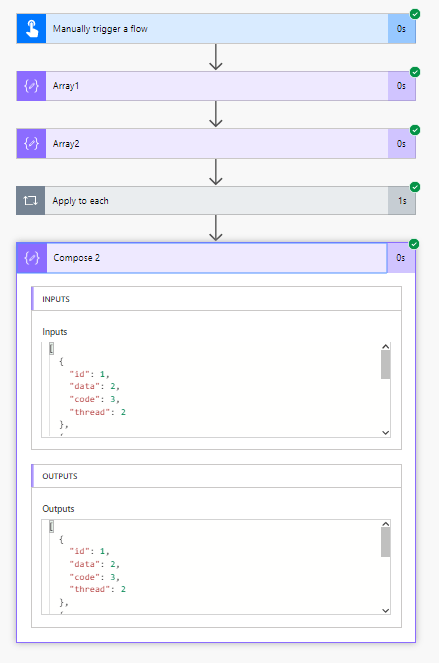
speedy solution for json joins in a flow

In this case I didn’t even enable the concurrency on the apply to each yet. When you are looking at larger data sets then you might have to consider doing so.

We need to have a look at the details of the flow.

Create arrays

To create the arrays I am using two compose actions. They are both a copy of my data as described earlier.
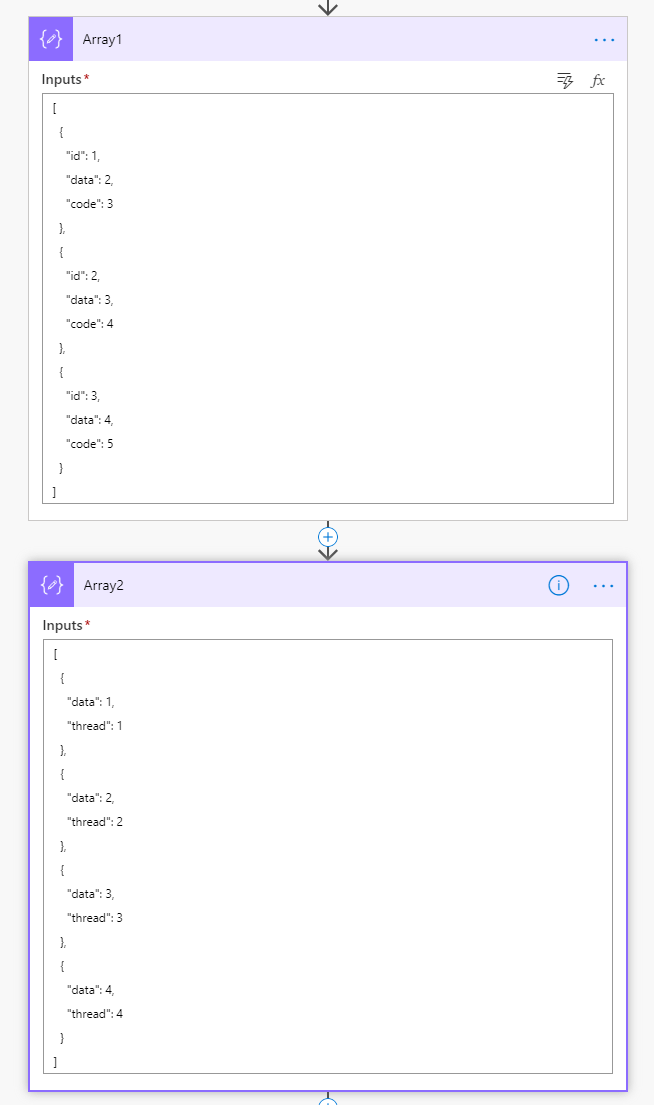
Two arrays of json in Compose actions

Filtering array 2

Now I’ll push the data into the Apply to each using the following expression in the Select an output from previous steps field.

outputs('Array1')

Now in the Filter array action the From is set to

outputs('Array2')

All there is left to do in the filter is set the filter to compare the data field from array 1 with the data field in array 2.

@equals(item()?['data'], items('Apply_to_each')?['data'])

Why?

Well, now we will only have the relevant item in the second array. to worry about. This 1 item we can now use in the Compose action in the Apply to each following the filter action.
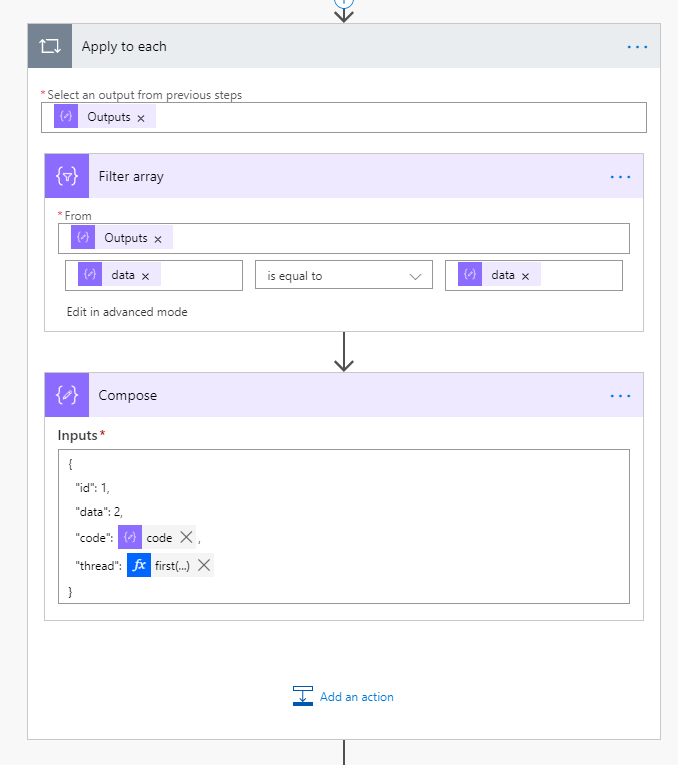
Filtering and collecting json arrays

If you have read the Pieter’s method post mentioned at the top of this post. Then you will understand that all we need to do is set the value of a compose inside the apply to each.

As shown below we use the following code:

{
"id": 1,
"data": 2,
"code": @{items('Apply_to_each')?['code']},
"thread": @{first(body('Filter_array'))?['thread']}
}

Note that we use the first function to turn a single item array into an object. In our example it is not necessary to handle multiple items in the second array. So we are lucky.

The Pieter’s method

Now all we need to do is, collect the array of items just after the apply to each step using a compose set to:

outputs('Compose')

This second compose action will now merge all the results of the Compose action inside the apply to each to a single array of objects that we want to get without taking any time at all.
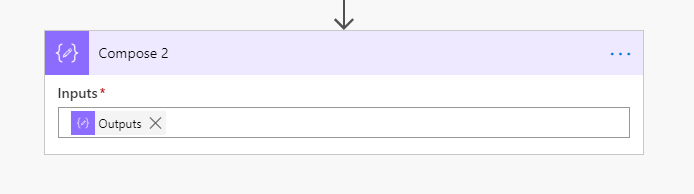
Final Compose action using Pieter's method

And our flow is complete as our array is build as we want it.

Further Thoughts

When working with json in Power Automate, performance of flows can be very complicated. Until of course you find a solution that works. The example shown in this post will not be covering all join options, however it should help make any kind of join possible. If you need any help making your flows perform then please do not hesitate to contact me.

Is your business still running on paper trails, sprawling Excel files, or ageing Access databases? There’s a better way — and I can show you exactly what it looks like. I’m the Technical Director of Vantage 365, a Microsoft solutions consultancy working with clients across the UK, the Netherlands, and worldwide. For over 30 years I’ve been turning messy, manual business processes into clean, automated systems that save time, reduce errors, and give teams the visibility they need to make better decisions. SharePains is not just any blog run by a Microsoft MVP. Have you ever used Try-Catch in Power Automate? The original post about Try-Catch in Power Automate can still be found on this site, https://staging.sharepains.com/2018/02/07/try-catch-finally-in-power-automate-flow/ Or have you ever used the Pieter’s method to avoid variables and speed up your flows? https://staging.sharepains.com/2020/03/11/pieters-method-for-advanced-in-flows/ You can contact me using contact@staging.sharepains.com

25 responses to “Create super fast joins of 2 arrays in Power Automate”

  1. Manish Jain Avatar
    Manish Jain

    Thanks it looks I am going right way !!

  2. Ed Avatar
    Ed

    I’ve been doing something similar, but I’m having to work with a couple of arrays with over 1000 records, and my matches may be as few as 10 records. With an apply to each going through 1000+ records, my process was running over an hour.

    What I did to fix this was pare down the array being used in the apply to each.
    In this scenario, I would do a select on Array 2 and only select the “code” field. Then I do a join on that array, let’s call the result array2Str.
    From there I filter Array1 where array2Str contains item()?[‘code’]
    Then I take the filtered Array1 and do the apply to each.
    This reduced my run time from over 1 hr to just a few seconds.

  3. Joseph Avatar
    Joseph

    Hello Pieter
    Thanks for the content and insight you provide.
    Regarding this bit that you wrote “In our example it is not necessary to handle multiple items in the second array. So we are lucky”.
    What if one is doubly lucky and has to handle multiple items in the second array? ?

    I have a quite similar situation and I have tried sooo many approaches but can’t isolate the different items in the apply to each from the second array.
    Both compose or append to string, used in different locations within nested apply to each, result in each individual record in one array receiving ALL the values from the second array that I would like to harvest information from; not just the matching values I would like.
    Do you have any posts/material/input you could point me towards that might help?
    Would be much appreciated.

  4. Joseph Avatar
    Joseph

    Pieter
    Thanks for the insight you provide.
    Regarding your statement “In our example it is not necessary to handle multiple items in the second array. So we are lucky”. What if one is doubly lucky and has to handle multiple items in the second array?

    I have a quite similar situation and I have tried sooo many approaches but can’t isolate the different items in the apply to each from the second array.
    Both compose or append to string, used in different locations within nested apply to each, result in each individual record in one array receiving ALL the values from the second array that I would like to harvest information from; not just the matching values I would like.
    Do you have any posts/material/input you could point me towards that might help?
    Would be much appreciated.

    1. Pieter Veenstra Avatar

      Hi Joseph,

      The easiest thing tondo is use a filter action to get the items from your 2nd array that you want to link with. Then you can also double check in the flow run that the right items are returned. Then use the output from the filter action to links things up.

      1. Joseph Avatar
        Joseph

        Apologies for the earlier double post. And thanks for taking time to respond.

        Using Filter does not seem to work. I realise I did not describe my problem accurately enough. In my situation, the second array key/value pairs also contain a nested array. So using your example, the thread keys would each contain their own arrays.
        And this deeper/3rd level array values are what I would like to bring to the top and combine with the top/first level array, but no matter what I try those values in the 3rd level array always come out as a total package.
        So, if thread keys 1, 2, 3, 4 (in your second array) each contained their own key value pairs (with example a “thread value” value) with respective values of e.g. a, b, c, d for each item, I am only able to get an end result of {“id”:1,”data”:2,”code”:3,”thread value”: [a, b, c, d]”} for each ID in the first array ad not the desired result like {“id”:1,”data”:2,”code”:3,”thread value”:b}.

        I would have thought it possible, in an apply to each, to reset/stop appending values from the 3rd level array once the 2nd level array in an apply to each has completed each iteration for each 2nd level array item. But that does not seem to be how it works. Appending strings and also Compose seem to just add every value at the third level iteration, without being able to tag which record in the 2nd level array was being iterated. Sorry if none of this makes sense.
        But if you can add anything else that would be great.

      2. Pieter Veenstra Avatar

        I would think in 2 steps.

        1. Massage the data. In this step reshape the data so that it looks like how you want it. You could use the Pieter’s method mentioned in the pot to pull out the nested array.

        Once you have your data right, then and only then consider using it to get to the end goal of using the data.

        These things can be really complicated but everything is possible.

      3. Joseph Ansah Avatar
        Joseph Ansah

        Thanks Pieter. I will have a retrace steps and see if an alternative approach e.g. the Pieter’s method ? can perhaps be used earlier in the Flow to give me the data structure I need to work with later in the Flow.

  5. Raghav Shenoy Avatar

    I get the error

    Flow save failed with code ‘InvalidTemplate’ and message ‘The template validation failed: ‘The inputs of template action ‘Filter_array’ at line ‘1 and column ‘7663’ is invalid. Action ‘Apply_to_each’ must be a parent ‘foreach’ scope of action ‘Filter_array’ to be referenced by ‘repeatItems’ or ‘items’ functions.’.’.

    1. Pieter Veenstra Avatar

      I would check the Filter Array action. It looks like it is using data outside its scope.

  6. Terry Tan Kim Leng Avatar
    Terry Tan Kim Leng

    Hi, I have question,

    During , I was trying to get output from “apply_to_each” in compose but I was unable to select because there is no output.

    it much appreciate to provided the guide

    Thanks

    1. Pieter Veenstra Avatar

      You will have to type

      outputs(‘Name_of_an_action_inside_the_apply_to_each’)

      You can’t select it from the Dynamic Content. You will have to type it using the expression editor

      1. Terry Tan Kim Leng Avatar
        Terry Tan Kim Leng

        Hey Pieter,

        Thanks for reply, second time, I also facing “Apply for Each” took process take quite long with 1455 data.

        For this is it normal ?

        Thanks and Regards,
        Terry

      2. Pieter Veenstra Avatar

        What are you doing inside the apply to each. Did you enable the Concurrency settings?

  7. Terry Tan Avatar
    Terry Tan

    Yes I did that but Concurrency settings, yes it took 2 hours for 1455 data take complete the process but all the result is “NULL” . Furthermore, This is my first ever to testing out using D365 for create 2 entities into single flow. Apologies in advance for give some trouble on you

    1. Pieter Veenstra Avatar

      Can you send me a screenshot of the inside of the apply to each using the chatvon the site

    2. markandersonus Avatar

      did you ever find a good solution for D365?

  8. Muhammed Nirjas Avatar
    Muhammed Nirjas

    hi
    how did you get the compose inside apply to each out of it

    1. Pieter Veenstra Avatar

      You just add a compose after the apply to each and then type the expression to get the output from the actions inside.

  9. David Benet Avatar
    David Benet

    I know this article is now been around for quite awhile, but it may help some with this addition:

    In the Compose step inside the Apply To Each replace

    {
    “id”: 1,
    “data”: 2,
    “code”: @{items(‘Apply_to_each’)?[‘code’]},
    “thread”: @{first(body(‘Filter_array’))?[‘thread’]}
    }

    With

    {
    “id”: @item()?[‘id’],
    “data”: @item()?[‘data’],
    “code”: @items(‘Apply_to_each’)?[‘code’],
    “thread”: @first(body(‘Filter_array’))?[‘thread’]
    }

    Now it is referencing the current “id” and “data” for the iteration of the loop

  10. Marcel Lathouwers Avatar

    @Pieter, is this approach still working?
    I tried this setup with one of my customers today and it would not let me save the flow. It refused to save because a kind of dependency between the apply-to-each action and the filter action.
    I don’t have the complete error at hand, but it was something like ‘filter action should be in the run after path of apply to each’

    1. Pieter Veenstra Avatar

      Hi Marcel, this should still work. If a flow doesn’t save then in general there is something wrong with an expression somewhere. Do you have any screenshots of the error? Feel free to post it to me on the chat here.

  11. fredrikgrondahl Avatar
    fredrikgrondahl

    Hi Pieter! I am currently stuck with this approach. I am dealing with multiple items, hence: “Note that we use the first function to turn a single item array into an object. In our example it is not necessary to handle multiple items in the second array.” Have you or someone found a solution to this?

    1. Pieter Veenstra Avatar

      Hi Fredrik,
      The challenge would be to make that perform. How many records are you looking at joining? The challenge is to avoid nested apply to each approaches. I would need to look into this a bit more, but I would expect to need a combination of apply to each, Pieter’s Method and the select action. Potentially with child flows avoiding the nesting of the apply to each.

      1. fredrikgrondahl Avatar
        fredrikgrondahl

        I have a table with 700 rows. Just to be clear, the arrays looks just like yours, buy I need every item of the “thread-string”, not just the first one. Koststed is the ID-column. Would be very intersting if there was an efficient approach to tackle this.

        Thanks for helping me out!

        Array 1:
        [
        {
        “Koststed”: “12543”,
        “Koststedsnavn”: “GRÜNERLØKKA SFO”,
        “Status”: “C”
        },
        {
        “Koststed”: “12545”,
        “Koststedsnavn”: “HASLE SFO”,
        “Status”: “C”
        },
        ….
        ]

        Array 2:
        [
        {
        “Koststed”: “12543”,
        “Seksjonsnummer”: “11”,
        “Seksjonsnavn”: “Skolefritidsordning”
        },
        {
        “Koststed”: “12545”,
        “Seksjonsnummer”: “11”,
        “Seksjonsnavn”: “Skolefritidsordning”
        },
        ….
        ]

Leave a Reply

This site uses Akismet to reduce spam. Learn how your comment data is processed.