Get the version number of your app in Power Apps

Get the version number of your app in Power Apps

By:

Date:

Have you ever tried to get the version number of your app developed in Power Apps to display in your app?

Version number

This version number helps you check that your user is running the right version of your app.
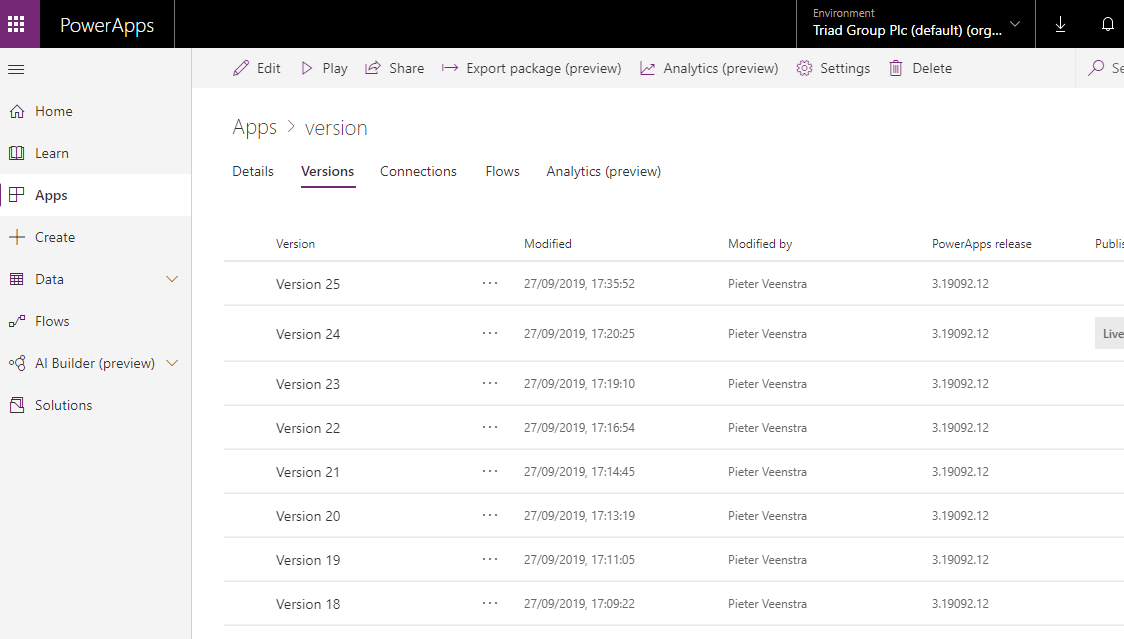
Version number in Power Apps

With the following expression you can get the version number of your existing app.
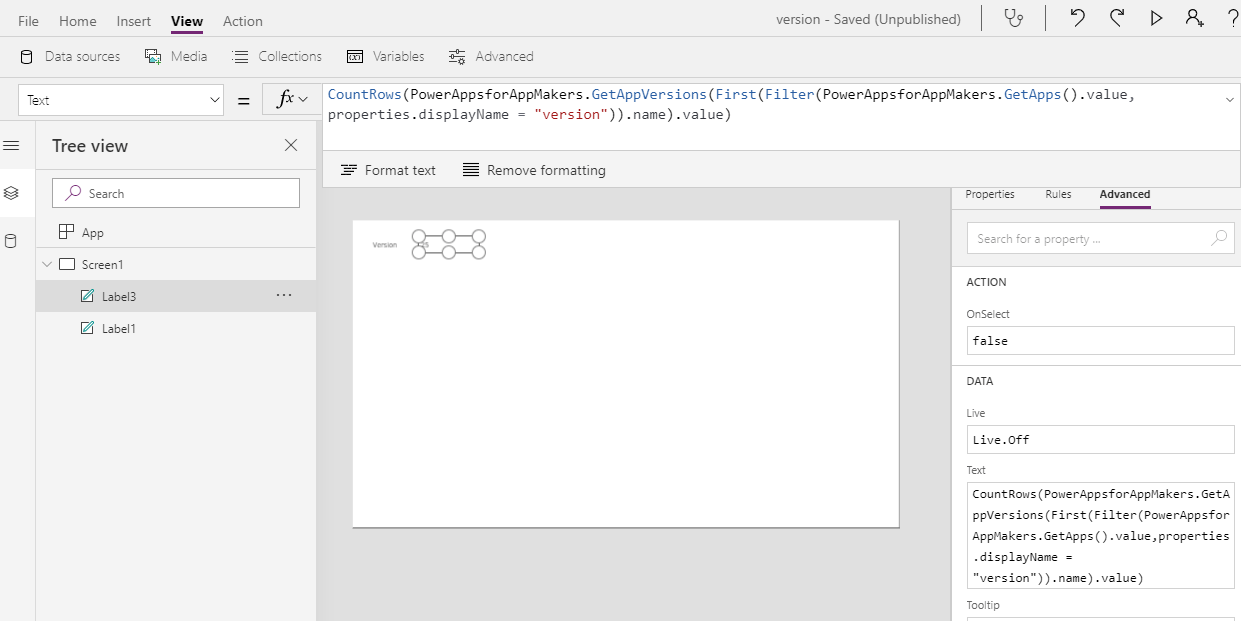
Version number expression in PowerApps

In my case my app is call version and the following expression is used to get the number:

CountRows(PowerAppsforAppMakers.GetAppVersions(First(Filter(PowerAppsforAppMakers.GetApps().value,properties.displayName = "version")).name).value)

!Note! The PowerAppsforAppMakers connector was recently renamed and the following code is the corrected version of the code:

CountRows(PowerAppsforMakers.GetAppVersions(First(Filter(PowerAppsforMakers.GetApps().value,properties.displayName = "version")).name).value)

Is your business still running on paper trails, sprawling Excel files, or ageing Access databases? There’s a better way — and I can show you exactly what it looks like. I’m the Technical Director of Vantage 365, a Microsoft solutions consultancy working with clients across the UK, the Netherlands, and worldwide. For over 30 years I’ve been turning messy, manual business processes into clean, automated systems that save time, reduce errors, and give teams the visibility they need to make better decisions. SharePains is not just any blog run by a Microsoft MVP. Have you ever used Try-Catch in Power Automate? The original post about Try-Catch in Power Automate can still be found on this site, https://staging.sharepains.com/2018/02/07/try-catch-finally-in-power-automate-flow/ Or have you ever used the Pieter’s method to avoid variables and speed up your flows? https://staging.sharepains.com/2020/03/11/pieters-method-for-advanced-in-flows/ You can contact me using contact@staging.sharepains.com

27 responses to “Get the version number of your app in Power Apps”

  1. Brad Miller Avatar
    Brad Miller

    This doesn’t work as I applied the line you gave above in a label… “PowerAppsforAppMakers” doesn’t exist. Can you give me some help?

    1. Pieter Veenstra Avatar

      You will need to add a connection to the Power Apps for App Makers connection. If you try to add a connection and search for Makers then you should find it.

  2. Brad Miller Avatar
    Brad Miller

    Thank you for the fast response. I was able to find the App Makers connection and add it. However, the name has changed from “PowerAppsforAppMakers” to “PowerAppsforMakers”. After applying that change, your function validates with no errors. However, I get nothing for the countrows function. Any further ideas?

    1. Pieter Veenstra Avatar

      Hi Brad.

      Looking at the total expression, I would start to split this up and use labels and galleries to display part of the expression. Or withihn the overall expression you can select parts of it . PowerApps will show you a preview of the data.

      So where the full expression is:

      CountRows(PowerAppsforAppMakers.GetAppVersions(First(Filter(PowerAppsforAppMakers.GetApps().value,properties.displayName = “version”)).name).value)

      You could try and check the value of
      Filter(PowerAppsforAppMakers.GetApps().value,properties.displayName = “version”)

      and then

      First(Filter(PowerAppsforAppMakers.GetApps().value,properties.displayName = “version”)).name

  3. Brad Miller Avatar
    Brad Miller

    Hi Pieter, Thank you again for your quick response!
    So for simplicity, I put this line in the App::OnStart method:
    ClearCollect(GetApps, PowerAppsforMakers.GetApps().value)

    This runs fine and gives me 5 columns (Id, name, properties, tags, type) when I look at my collections. Unfortunately, I get no rows.

    I feel like I am missing something basic for this not to work. Any more suggestions?

    Thank you,
    Brad

    1. Pieter Veenstra Avatar

      Maybe a silly question, but has your app been published?

  4. Brad Miller Avatar
    Brad Miller

    Not a silly question. Yes, it has been published. When I look at the details of my app and click the Versions tab, I am up to Version 48.

    1. Pieter Veenstra Avatar

      Hi Brad,

      I just tested the code again ( I updated the code to use the new Connector name in the post) and for me I’m still getting a single number returned.

  5. Paul Ewert Avatar

    It appears PowerAppsForMakers.GetApps() does not get apps constructed from a SharePoint list form (i.e. [SharePoint list view] > Power Apps > Customize forms). Note that what Pieter shares above is a count of the number of versions for an app. This count should match the latest version number given in the version history because the numbers are re-calculated when a prior version is deleted. The real “version” number given by PowerAppsForMakers can be found with the following:

    First(Filter(PowerAppsforMakers.GetApps().value, properties.displayName = “[name of your app]”)).properties.appVersion

    Note that this doesn’t return a version number, but a version date instead. Also note the slight difference from Pieter’s guidance where he said to use “properties.displayName = ‘version’”. That “version” was placeholder text that needs to be updated per the name of the app being queried.

    1. liamcromar Avatar

      While this code from Paul correctly returns the publishing date of the last version, it appears to do this regardless of the version of the running app. So it doesn’t seem suitable for the use case in the original post – that of checking which version the user is currently running.

      (This code could come in handy, though – if the publishing date of the currently running version could be compared with the date of the last released version, it should be possible to create an ‘update needed’ alert to the user.)

  6. JJ Avatar
    JJ

    This is great. If we need to extract the latest published version, how would we do it? Can you guide on that?

    1. Pieter Veenstra Avatar

      You can actually use, PowerAppsforAppMakers.GetAppVersions(“App ID”) to extract all versions of your app. It will also include the status like published.

  7. Rizky Aditya Avatar
    Rizky Aditya

    Good day Pieter,

    I noticed something weird when applying this to my app.
    I am using exactly the same syntax like yours, only use it to set variable called varVersion.

    Set(varVersion, CountRows(PowerAppsforMakers.GetAppVersions(First(Filter(PowerAppsforMakers.GetApps().value,properties.displayName = “My App Name”)).name).value))

    I get the number, but it only maxed up to 150.
    My real version was around 600 something.

    Any idea why would this happened?

    1. Pieter Veenstra Avatar

      It looks like the AppVersions might have a limit of 150 item.

  8. Marie Castine Avatar
    Marie Castine

    I have been using this code for over a year and it stopped working this morning. It shows the date as 6/11/2021 11:01am but I have published multiple times and it is not updating. When I hover over the code, it says “invalid date”. Did anything change in the core of power apps to mess up the coding? I haven’t touched the code and it is messed up in all of my apps – i opened, updated and save/publish but the date/time isn’t updating.
    (First(Filter(PowerAppsforMakers.GetApps().value,properties.displayName = “MyAppName”)).properties.appVersion)

  9. Harald Osmann Avatar
    Harald Osmann

    I managed to get the version date of the last published version into my application (sorry, german version…):

    Set (
    MyVersions;
    PowerAppsfürEntwickler.GetAppVersions(“xxxxx-xxxxxxxx-yyyyyyyy-yyyyyyy”)
    );;
    Set (PublishedVersion; “Version: ” & First(Filter(MyVersions.value.properties;properties.lifeCycleId = “Published”)).properties.appVersion

    So I can use the global variable PublishedVersion everywhere in my PowerApp. But from my point of view this implementation by Microsoft is worthless, because in this way it shows the version number of the latest version on the server, but not the version number of the PowerApp, that might come out of the browser cache in the current browser session. And this is what I need to know: Does the user work with the latest published version, or with a former cashed version? The variable always shows the latest version an not the currently into the browser loaded version 🙁 …

    1. Koen Mathijs Avatar
      Koen Mathijs

      @Harald

      I see a possible error in your code:
      Set (PublishedVersion; “Version: ” & First(Filter(MyVersions.value.properties;properties.lifeCycleId = “Published”)).properties.appVersion

      should be:
      Set (PublishedVersion; “Version: ” & First(Filter(MyVersions.properties;properties.lifeCycleId = “Published”)).properties.appVersion

      There is no MyVersions.value in my opinion. Correct?

  10. Marie Castine Avatar
    Marie Castine

    I have been using this feature for over a year and today none of my apps are updating the version date. I created a new label, added the code again to it by typing it all out and it is not showing the correct date. All of my apps show last Friday even if i did not publish the app last friday. Any ideas on troubleshooting? I noticed because I published an app multiple times and the date is still 10/1. Did microsoft update something?

    1. Pieter Veenstra Avatar

      Hi Marie, I just tried this out and it still works for me.

  11. Rob Elliott Avatar
    Rob Elliott

    The main problem I am facing is that the throttling limit on the api is 100 calls every 60 seconds, so any versions above 100 are not displayed. A real annoyance: perhaps Microsoft never expected that an app would ever have more than 100 versions which is a bit short-sighted of them!

    Rob
    Los Gallardos
    Intranet, SharePoint and Power Platform Manager (and classic 1967 Morris Traveller driver)

    1. Haravindh Avatar
      Haravindh

      Hi Pieter veenstra,

      I have app versions of more than 1700 in prod and i am facing issue bcoz it has a limit of 100 rows .
      Can u please help me in this issue.It would be helpful in my project.
      Thanks in advance

      1. Pieter Veenstra Avatar

        I would consider just manually type a version number in a label

      2. Haravindh Avatar
        Haravindh

        I have entered the code in onstart property and these working fine till 100 version i am getting popup but if the version is more than 100 due to delegation the popup is being visible for latest version as well

  12. Jesse Avatar
    Jesse

    One error with the logic on this – it’s showing the count of total SAVED versions, not published versions. So if you have a revision that you’re working on but haven’t published yet, it’ll still count towards the total in the published app.

    You’ll want to include a filter to only include published versions:

    CountRows(Filter(PowerAppsforMakers.GetAppVersions(First(Filter(PowerAppsforMakers.GetApps().value,properties.displayName = “Your App Name”)).name).value, properties.lifeCycleId = “Published”))

    1. Pieter Veenstra Avatar

      Personally ??I started to go back to just putting a label inside my app that displays a version number text that is manually updated. That ways I can at least see which version is in Dev, Test and Production.

Leave a Reply

This site uses Akismet to reduce spam. Learn how your comment data is processed.