If you have been using Microsoft Flow, Power Apps or Power BI for a while then I’m sure that you have been using the Common Data Service (CDS).
Architecture of Common Data Service
At least you have been looking into the CDS or at least you have heard some people talking about the CDS.
If you don’t know what Common Data Service is then this first of a series of posts is for you.
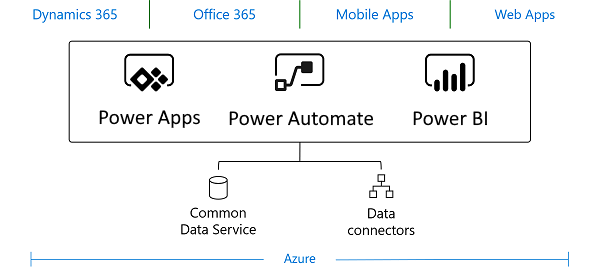
The CDS is the preferred data layer for your PowerApps, Flow and Power BI. This doesn’t mean that you suddenly need to move all your data into a CDS, but it does mean that Microsoft would like you to move your data there if that is possible.
Why would you use the CDS?
On the Common Data Service introduction page Microsoft gives us 6 reasons to use the CDS:
- Easy to manage
- Easy to Secure
- Access to you Dynamics 365
- Rich metadata
- Logic and validation
- Productivity tools
Although all of this might be right, for me there is only one main reason to use CDS above for example SharePoint lists. Being a SharePointer I am used to putting my data in SharePoint lists. When using a lot of data however I’ve always found SharePoint lists very limiting. SharePoint is simply not a database.
Why not use SQL then?
Using SQL to store your data in is of course a good alternative too, however it does mean that you have to have the SQL skills. Designing data and designing a performing database are two different things. The CDS takes a lot of the potential troubles away for you.
How to get started with the Common Data Service?
It is easy to start with PowerApps and/or Flow in your production environment create some entities and apps and before you know it you think that you’ve created something good. It is wise to first consider things like governance and data design. When you use the Common Data Services you are working with a database that can be used across multiple application. The Just go ahead and put something together will almost certainly result in some regrets later on.
Further information about CDS
Common Data Services – a complete overview
Pieter Veenstra

Is your business still running on paper trails, sprawling Excel files, or ageing Access databases? There’s a better way — and I can show you exactly what it looks like. I’m the Technical Director of Vantage 365, a Microsoft solutions consultancy working with clients across the UK, the Netherlands, and worldwide. For over 30 years I’ve been turning messy, manual business processes into clean, automated systems that save time, reduce errors, and give teams the visibility they need to make better decisions. SharePains is not just any blog run by a Microsoft MVP. Have you ever used Try-Catch in Power Automate? The original post about Try-Catch in Power Automate can still be found on this site, https://staging.sharepains.com/2018/02/07/try-catch-finally-in-power-automate-flow/ Or have you ever used the Pieter’s method to avoid variables and speed up your flows? https://staging.sharepains.com/2020/03/11/pieters-method-for-advanced-in-flows/ You can contact me using contact@staging.sharepains.com


Leave a Reply
You must be logged in to post a comment.