Move a list item attachment to a Document Library with Power Automate

Create file from attachments

Move a list item attachment to a Document Library with Power Automate

By:

Date:

In this post the easy steps for the creation of files when you receive list item attachments.

Triggering the flow when an item arrives

How do we get those files from the list items to move into a document library?

To trigger the flow we can use the When an item is created or modified trigger. Then using the Get attachments it is easy to get all the attachments for the list item that was created.
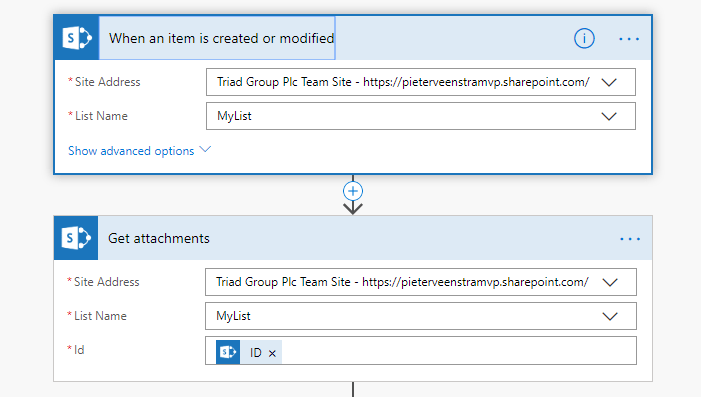
Get list item Attachment

Processing the list item attachments

Now that we have the attachments. Note that we can get more than one attachment.

We will need to get the content of each attachment. With the content we can create a file in  document library of choice.
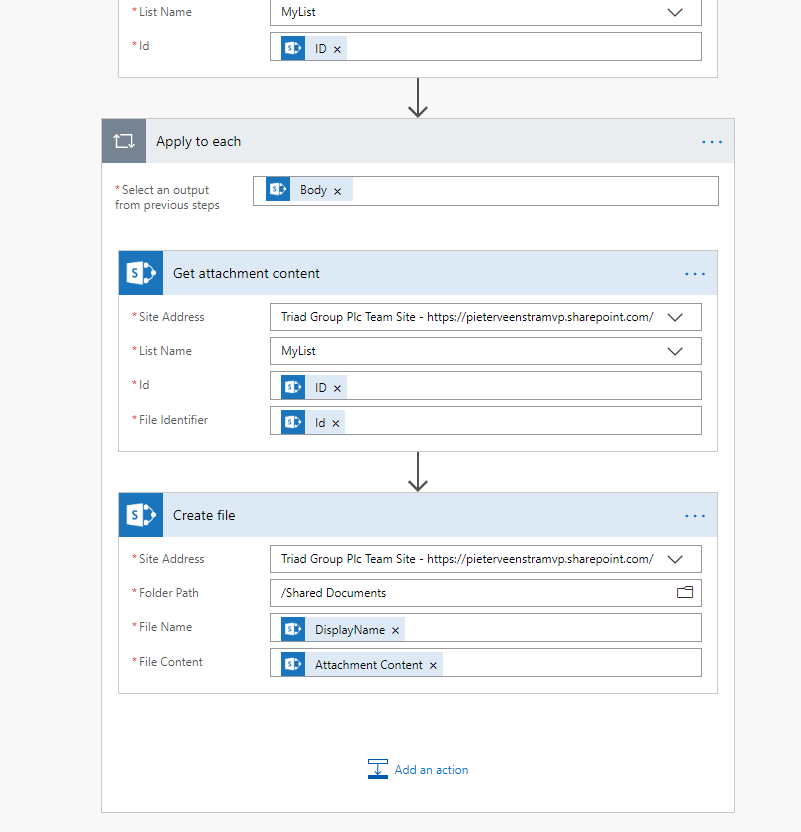
Create Files

To get the file name the same as used within the attachment the DisplayName can be used. The DisplayName is available within the  Dynamic content coming from the Get Attachment Content action.

Once the above steps are added to the flow my file is created.
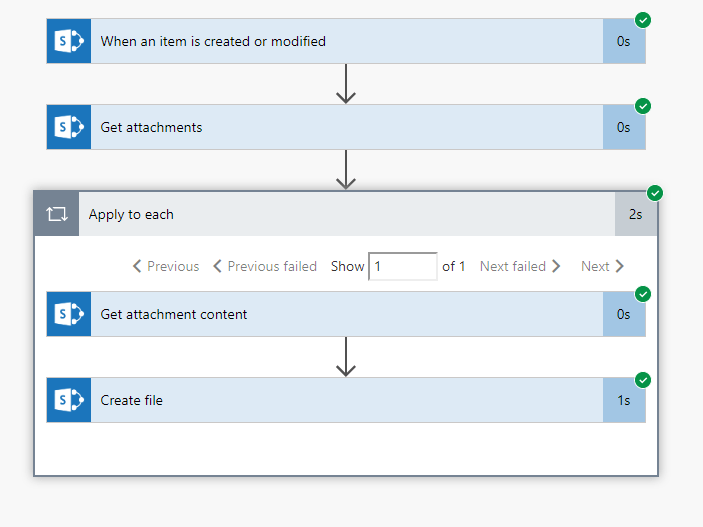
Create file from attachment

Is your business still running on paper trails, sprawling Excel files, or ageing Access databases? There’s a better way — and I can show you exactly what it looks like. I’m the Technical Director of Vantage 365, a Microsoft solutions consultancy working with clients across the UK, the Netherlands, and worldwide. For over 30 years I’ve been turning messy, manual business processes into clean, automated systems that save time, reduce errors, and give teams the visibility they need to make better decisions. SharePains is not just any blog run by a Microsoft MVP. Have you ever used Try-Catch in Power Automate? The original post about Try-Catch in Power Automate can still be found on this site, https://staging.sharepains.com/2018/02/07/try-catch-finally-in-power-automate-flow/ Or have you ever used the Pieter’s method to avoid variables and speed up your flows? https://staging.sharepains.com/2020/03/11/pieters-method-for-advanced-in-flows/ You can contact me using contact@staging.sharepains.com

6 responses to “Move a list item attachment to a Document Library with Power Automate”

  1. Joseph Avatar
    Joseph

    How can this be modified to 1st check to see if the Document Library already has the file (by DisplayName or other meta data), and if NOT, then create per flow, ELSE do not create a new document library item, but instead, replace the file with this new one.

    Currently, using the flow above, I end up with duplicates all over my Document Library whenever duplicate items are saves to my sharepoint list.

    1. Pieter Veenstra Avatar

      Hi Joseph,

      I think that you are looking for something like this:
      https://veenstra.me.uk/2018/12/03/microsoft-flow-import-list-data-from-an-excel-spreadsheet-into-sharepoint-lists/

      The above post is for lists and list items but the logic should be fairly similar.

  2. Lily Avatar
    Lily

    Thanks a lot, I implemented this already. Now, I’m wondering when a document is deleted from my SP List, how to run a MS flow to delete that file from the document library. I tried to use the same logic as creating, but I couldn’t figure it out.

    1. Pieter Veenstra Avatar

      You could use the when an item is deleted trigger.

      When you create the document fromt ge attachment set a property on the document to the id of the list item.

      Now you can use the item id to delete the matching documents.

      Does that work for you?

  3. Denine Avatar
    Denine

    Is there a solution for when the file is greater than 250 mb. The “Get Attachment Content” fails when it is over 100 mb.

    1. Pieter Veenstra Avatar

      Hi Denine, There are a few places where these kind of limitations could cause problems. Reading the attachments and the creation of the file. You could potentially use the REST API or the Graph API directly and use the various options to optimize the calls to handle larger files.

Leave a Reply

This site uses Akismet to reduce spam. Learn how your comment data is processed.