When you send data from Power Apps to Power Automate, do you use more than one parameter?
Power Apps and Power Automate integration
Within Power Apps you can send data to Power Apps using the Ask in Power Apps in dynamic content. This quite quickly means that you end up with a lot of parameters when you want to pass a lot of data to your flow. This can become quite hard to manage.
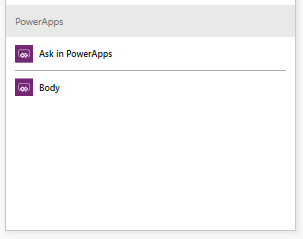
On top of this if you decide that you need an additional parameter you will have to disconnect your flow from your Power App after you added the additional parameter to your flow.
Less Parameters
In short, this can be a pain! A pain to be solved in this post.
I’m starting by creating a single input in my Flow. My input is called Compose_inputs, but you could call it anything you like.
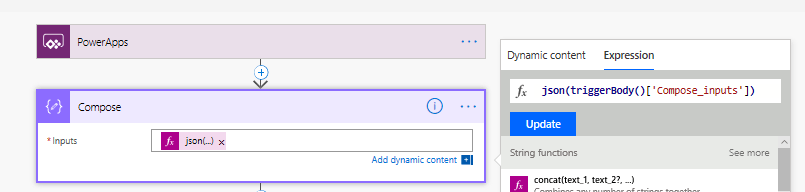
Then in my Compose action I’m converting the json text to json object using the json function. You could of course also use the parse json action, however this will be more flexible as I might not know the exact format of my json that is sent to the flow.

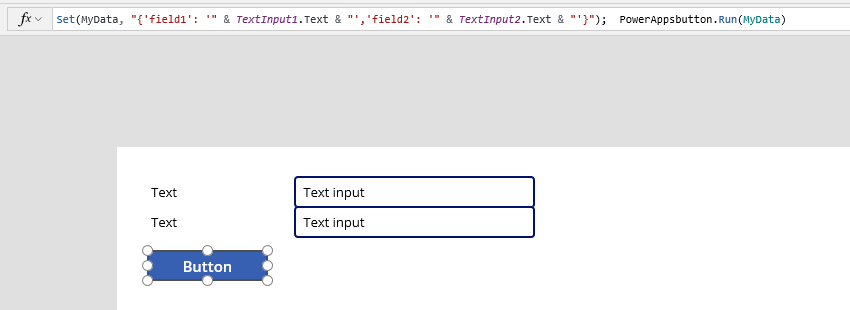
In my Power App I’m adding a button that sets a variable with the json text that I want to send to Flow.
My thoughts
The method described in this post:
- Avoids having to recreate the Power Apps/Flow integration when the number of parameters change
- Avoids many parameters when running flows from Power Apps
Pieter Veenstra

Is your business still running on paper trails, sprawling Excel files, or ageing Access databases? There’s a better way — and I can show you exactly what it looks like. I’m the Technical Director of Vantage 365, a Microsoft solutions consultancy working with clients across the UK, the Netherlands, and worldwide. For over 30 years I’ve been turning messy, manual business processes into clean, automated systems that save time, reduce errors, and give teams the visibility they need to make better decisions. SharePains is not just any blog run by a Microsoft MVP. Have you ever used Try-Catch in Power Automate? The original post about Try-Catch in Power Automate can still be found on this site, https://staging.sharepains.com/2018/02/07/try-catch-finally-in-power-automate-flow/ Or have you ever used the Pieter’s method to avoid variables and speed up your flows? https://staging.sharepains.com/2020/03/11/pieters-method-for-advanced-in-flows/ You can contact me using contact@staging.sharepains.com


Leave a Reply
You must be logged in to post a comment.