I had a chat with Paul Culmsee about Power Automate missing triggers when he uploaded documents with OneDrive Sync.
Setup Sync
I created a document library and setup Sync.

Uploading documents using SharePoint
I then uploaded documents to this library using SharePoint and I copied some documents locally on my PC so that the Sync client would pick up these files and put them into SharePoint.
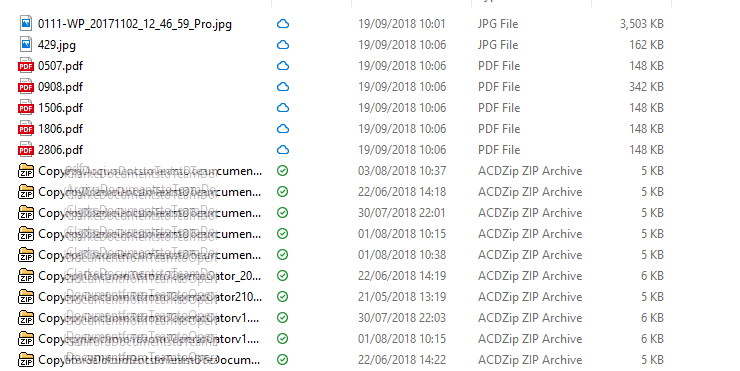
All of these files are now in my SharePoint library. Note that the Date modified date for the documents is different? Files uploaded to SharePoint have a modification date of today (19/09/2018) and the document that I copied locally and Synced to SharePoint kept their original date. This is very important!
Flows (not) triggered by my documents
Now I’m going to look at Power Automate. I created the flow shown below before I uploaded my documents.

When looking at the run history in Flow I’m only finding back run history for the documents that I uploaded to SharePoint.
Why?
At first I was thinking that Flow is ignoring document and that Flow is broken here. Having had a bit more of a detailed look into this however I’m not so sure. A lot of the Flow technology depending on web hooks and one of the things webhooks does is us a last change token. This is to ensure that you only pickup changes since a certain date. More information on this can be found in SharePoint webhooks sample reference implementation.
I currently don’t really have a solution for this other than make sure that you upload document to SharePoint rather than synchronising document to SharePoint. When I do have any better solution then I will update this post.
Pieter Veenstra

Is your business still running on paper trails, sprawling Excel files, or ageing Access databases? There’s a better way — and I can show you exactly what it looks like. I’m the Technical Director of Vantage 365, a Microsoft solutions consultancy working with clients across the UK, the Netherlands, and worldwide. For over 30 years I’ve been turning messy, manual business processes into clean, automated systems that save time, reduce errors, and give teams the visibility they need to make better decisions. SharePains is not just any blog run by a Microsoft MVP. Have you ever used Try-Catch in Power Automate? The original post about Try-Catch in Power Automate can still be found on this site, https://staging.sharepains.com/2018/02/07/try-catch-finally-in-power-automate-flow/ Or have you ever used the Pieter’s method to avoid variables and speed up your flows? https://staging.sharepains.com/2020/03/11/pieters-method-for-advanced-in-flows/ You can contact me using contact@staging.sharepains.com


Leave a Reply
You must be logged in to post a comment.