In this post I will look at how to maintain list items in SharePoint lists. This post is part of my User guide to using the SharePoint REST API in Microsoft Flow for no-code developers series.
Various operations to maintain list items
I will look at the following operations on a list in this post.
- Get list item details
- Create a list item
Getting the list item details is easy using the Send an HTTP request to SharePoint action. Simply select the Site Address and supply the API URI then supply the body details and a SharePoint coder would be quite happy to create all of this within less than no time. I have found however that no-code developers struggle sometimes.
To make all of this easy for no-coders, I’m going to start by setting some variables.
- ListName
- ListItemId
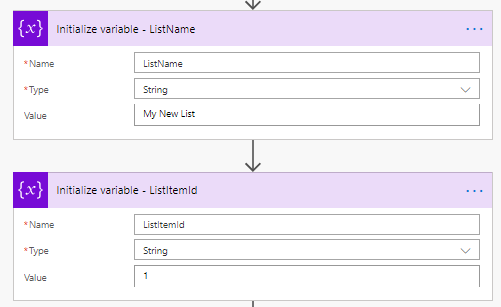
Get the item details
First of all you could just use the Get Items action available in Microsoft Flow. But if you want to get to the more advanced options then the Send an HTTP request to SharePoint action might give you some more flexibility.

And when we run the flow the details of my list item are returned:
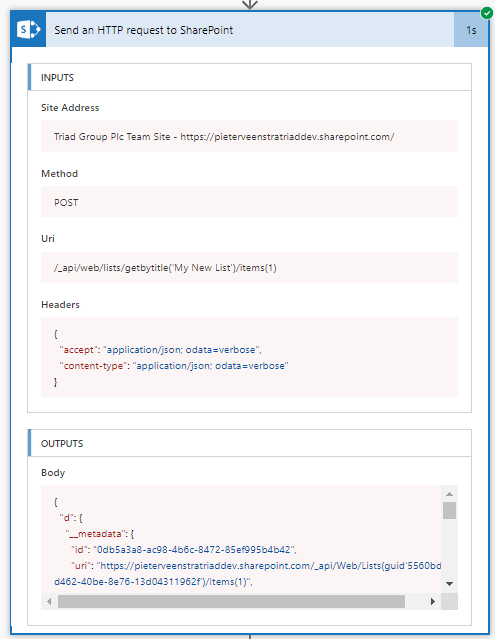
Note for code developers: You could run the HTTP request with nometadata rather than verbose as that may simplify the output a bit.
Create a list item
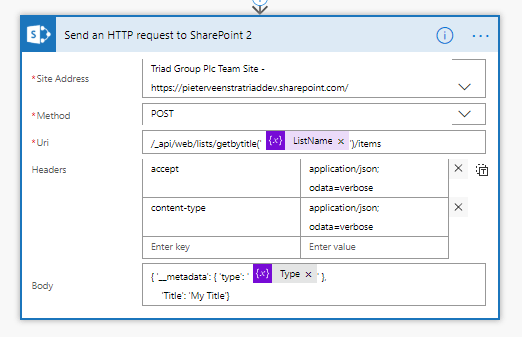
The Create a list item is slightly more complicated than the examples we have looked at so far. We will need two Send Http request to SharePoint actions. As mentioned on the REST API documentation we will need to get the ListItemEntityTypeFullName first before we can create a list item.
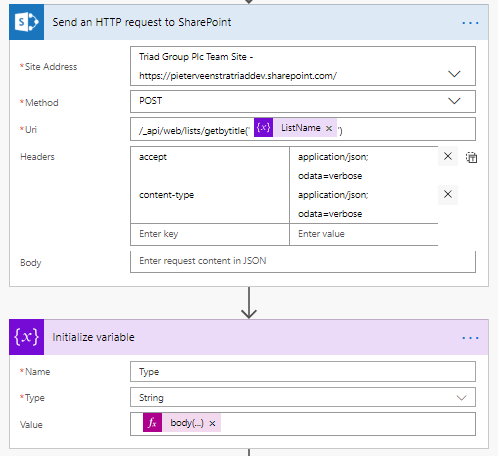
Now we can use the Type variable to create a new item
FAQs
Can I create list items without using REST APIs in Power Automate?
Yes, you can you the Create item in the SharePoint connector however the REST API makes it easier to control the finer detail. Especially for the more complex fields the REST API might be easier to use.
Pieter Veenstra

Is your business still running on paper trails, sprawling Excel files, or ageing Access databases? There’s a better way — and I can show you exactly what it looks like. I’m the Technical Director of Vantage 365, a Microsoft solutions consultancy working with clients across the UK, the Netherlands, and worldwide. For over 30 years I’ve been turning messy, manual business processes into clean, automated systems that save time, reduce errors, and give teams the visibility they need to make better decisions. SharePains is not just any blog run by a Microsoft MVP. Have you ever used Try-Catch in Power Automate? The original post about Try-Catch in Power Automate can still be found on this site, https://staging.sharepains.com/2018/02/07/try-catch-finally-in-power-automate-flow/ Or have you ever used the Pieter’s method to avoid variables and speed up your flows? https://staging.sharepains.com/2020/03/11/pieters-method-for-advanced-in-flows/ You can contact me using contact@staging.sharepains.com


Leave a Reply
You must be logged in to post a comment.