Today I tried to create a form in Power Apps where I needed to filter the options available in the drop down depending on an option selected in a different field.
The initial setup
I have the following plumbing already done.
- I created a datasource Contact List_1 which is a list of contacts in SharePoint
- I created a datasource Opportunities which uses SharePoint list called Opportunities
- The both Opportunities and Contact List have a lookup column called Client
- The Contact list has a single line of text column, Fullname
- My Opportunity list has multi select lookup column, OpportunityContacts
I now want my Power App to only show the contacts relevant to the client selected.
Initially Power Apps would use Choices(Opportunities.OpportunityContacts) to get all my contacts in the Opportunities datasource and my contacts appear in my drop down. This is good but if you want to only show contacts related to a specific client then this isn’t useful. On purpose I called my Client column in my contacts list Company. Just so that it becomes easier to analyse the functions following in this post.
Power Apps filter function
To do the filtering we will need to use the Filter function.
So we would be looking at something like this:
Filter(Choices(Opportunities.OpportunityContacts),<Filter>)
So for each of my contacts I’m going to filter by looking in the Contact List 1 datasource if the Company name matches the client name in my opportunity.
A “Value in <List of contacts>” would be the rough construction that I’m going to use.
Filter(Choices(Opportunities.OpportunityContacts), Value in <List of contacts>)
To filter the list of contacts by the Company name I’m having to look at the data coming from the ‘Contact List 1’ datasource and filter by Company name and return the full name of the contact.
The following Filter function will do this: Filter(‘Contact List_1’, Company = DataCardValueClient.Text).FullName
Putting all the different elements together I’m looking at this:
Filter(Choices(Opportunities.OpportunityContacts),Value in Filter('Contact List_1', Company = DataCardValueClient.Text).FullName )
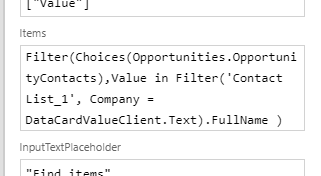
The complete cascaded drop down
With the above filters in place I’m now getting a drop down that lists only my relevant contacts for a client.

Pieter Veenstra

Is your business still running on paper trails, sprawling Excel files, or ageing Access databases? There’s a better way — and I can show you exactly what it looks like. I’m the Technical Director of Vantage 365, a Microsoft solutions consultancy working with clients across the UK, the Netherlands, and worldwide. For over 30 years I’ve been turning messy, manual business processes into clean, automated systems that save time, reduce errors, and give teams the visibility they need to make better decisions. SharePains is not just any blog run by a Microsoft MVP. Have you ever used Try-Catch in Power Automate? The original post about Try-Catch in Power Automate can still be found on this site, https://staging.sharepains.com/2018/02/07/try-catch-finally-in-power-automate-flow/ Or have you ever used the Pieter’s method to avoid variables and speed up your flows? https://staging.sharepains.com/2020/03/11/pieters-method-for-advanced-in-flows/ You can contact me using contact@staging.sharepains.com


Leave a Reply
You must be logged in to post a comment.