Today, I wanted to get a full overview of all the Microsoft Teams teams sites that I have in my tenant. I decided to put PnP PowerShell to the test for this.
I found that Get-PnPTenantSite didn’t include my team sites and therefore I had to look for different options. Quite quickly I found a solution. I had to go through the following steps:
- Connect to my SharePoint Admin Center site.
- Get a list called: DO_NOT_DELETE_SPLIST_TENANTADMIN_AGGREGATED_SITECOLLECTIONS
- Display the list items in this list
Connecting to the Admin Center site
To connect to the Admin Center site I’m running the following command:
[code lang=text]
Connect-PnPOnline https:/ /mytenant-admin.sharepoint.com
[/code]
Get the list
First I need to get the site. Then I load my lists just to have a look at which lists exist:
[code lang=text]
$site = Get-PnPSite
$site.Context.Load( $site.RootWeb)
$site.Context.ExecuteQuery()
$web = $site.RootWeb
$site.Context.Load( $web.Lists)
$site.Context.ExecuteQuery()
[/code]
Now a quick look at $web.Lists shows me that there is a list with a very long name: DO_NOT_DELETE_SPLIST_TENANTADMIN_AGGREGATED_SITECOLLECTIONS

Not sure who came up with this name for a list. But it is very noticeable.
Now I get my list:
[code lang=text]
$list = $web.Lists[5]
[/code]
Display The List Items
Ok, we are nearly there. Just get all the list items and spit out the SiteUrl
[code lang=text]
for ($x = 0; $x -lt $list.ItemCount; $x++ )
{
$item = $list.GetItemById($x)
$site.Context.Load( $item)
$site.Context.ExecuteQuery()
Write-Host $item.FieldValues.SiteUrl : $item.FieldValues.TemplateTitle
}
[/code]
Yes I know I could clean up the above code a bit. e.g. use a Query and query the list for the list items. But for simplicity I kept the code as simple as possible.
Ok, So now I’ve got all of my site collections listed with their templates used. All the sites marked Team site are my modern team sites.
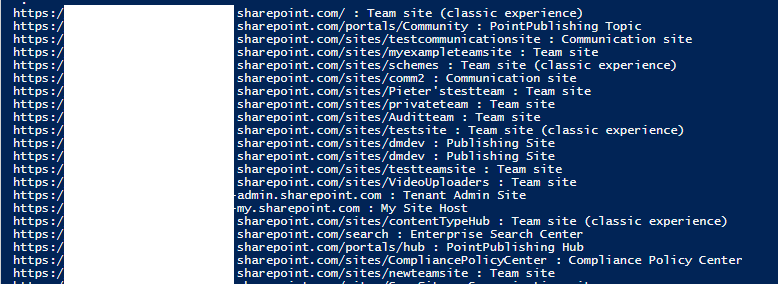
So now we need to find a way to filter out the Modern Team sites that were created within SharePoint rather than Microsoft Teams. ( Thanks Paul Keijzers for pointing this out
!). Unfortunately there isn’t an option for this yet!
Pieter Veenstra

Is your business still running on paper trails, sprawling Excel files, or ageing Access databases? There’s a better way — and I can show you exactly what it looks like. I’m the Technical Director of Vantage 365, a Microsoft solutions consultancy working with clients across the UK, the Netherlands, and worldwide. For over 30 years I’ve been turning messy, manual business processes into clean, automated systems that save time, reduce errors, and give teams the visibility they need to make better decisions. SharePains is not just any blog run by a Microsoft MVP. Have you ever used Try-Catch in Power Automate? The original post about Try-Catch in Power Automate can still be found on this site, https://staging.sharepains.com/2018/02/07/try-catch-finally-in-power-automate-flow/ Or have you ever used the Pieter’s method to avoid variables and speed up your flows? https://staging.sharepains.com/2020/03/11/pieters-method-for-advanced-in-flows/ You can contact me using contact@staging.sharepains.com


Leave a Reply
You must be logged in to post a comment.