Today I upgraded my development SharePoint 2013 farm and things didn’t go as they should. The installation of the update all worked fine, but when I ran the SharePoint Products Configuration Wizard things went a bit belly up.
During the configuration step 5/6 suddenly things went wrong. I the logs I found the following errors:
08/18/2015 08:59:34 13 ERR Task services has failed with an unknown exception
08/18/2015 08:59:34 13 ERR Exception: System.Reflection.TargetInvocationException: Exception has been thrown by the target of an invocation. —> System.ArgumentException: The directory name you entered is invalid. Please enter a new name.
at Microsoft.SharePoint.Administration.SPDiagnosticsService.set_LogLocation(String value)
at Microsoft.SharePoint.Administration.SPDiagnosticsService.InitSPDiagnosticsServiceFromRegistry(SPDiagnosticsService service)
— End of inner exception stack trace —
at System.RuntimeMethodHandle.InvokeMethod(Object target, Object[] arguments, Signature sig, Boolean constructor)
at System.Reflection.RuntimeConstructorInfo.Invoke(BindingFlags invokeAttr, Binder binder, Object[] parameters, CultureInfo culture)
at Microsoft.SharePoint.PostSetupConfiguration.ReflectionHelper.InvokeConstructor(String assemblyQualifiedName, Type[] constructorSignature, Object[] constructorParameters)
at Microsoft.SharePoint.PostSetupConfiguration.TaskCommon.ReflectionHelperInvokeConstructor(String assemblyQualifiedName, Type[] constructorSignature, Object[] constructorParameters, TaskBase task)
at Microsoft.SharePoint.PostSetupConfiguration.ServicesTask.InvokeServiceConstructor(String serviceRegistryKeyName, String solutionIdRegistryName, String serviceNameRegistryName, Type[] constructorSignature, Object[] constructorParameters)
at Microsoft.SharePoint.PostSetupConfiguration.ServicesTask.InstallServiceInConfigDB(Boolean provisionTheServiceToo, String serviceRegistryKeyName)
at Microsoft.SharePoint.PostSetupConfiguration.ServicesTask.InstallServices(Boolean provisionTheServicesToo)
at Microsoft.SharePoint.PostSetupConfiguration.ServicesTask.Run()
at Microsoft.SharePoint.PostSetupConfiguration.TaskThread.ExecuteTask()
The diagnostic logging service failed as a directory didn’t exist. hmm, strange because the upgrade logs reporting the message back to me still used D:\Logs but when looking at Regedit my logs seems to be in E:\Logs.
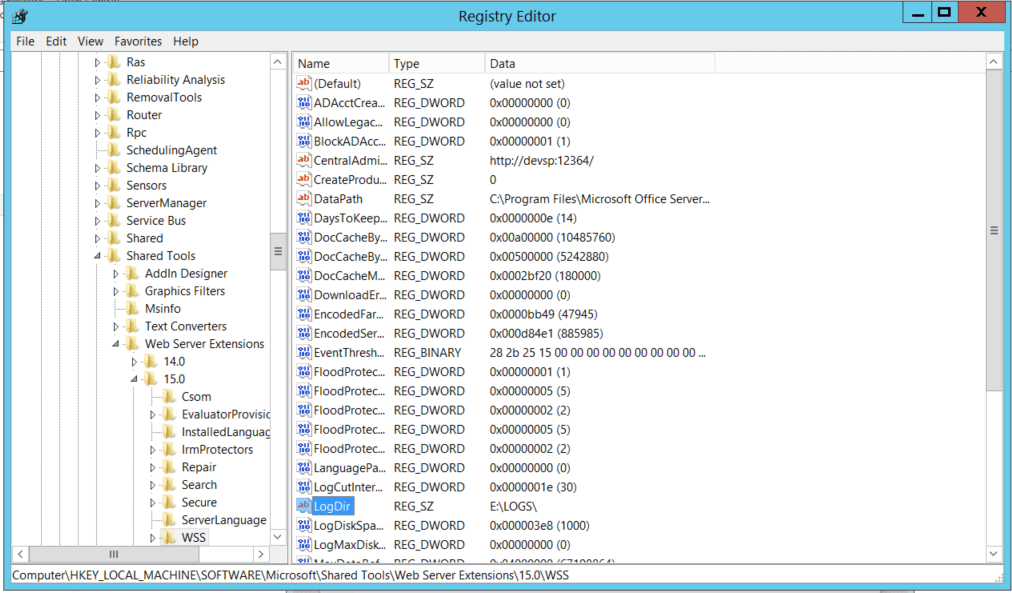
Something is not right here. I’m sure that my logs always lived in D:\ rather than E:\ and E:\ is taken by my DVD drive. So SharePoint can’t create the required log drive on my E drive.
First I moved my DVD drive to Z: so that it is out of the way.
Then I mapped an E drive to point at \server\d$ at least whatever is wrong can now be fixed and my products wizard can run again.
No that SharePoint is up and running again I don’t really want to keep the E and D drives mapped at each other. So within Central admin I updated my diagnostic logging directory and all seems to be working as expected again.
I’m not sure what happened but at least I’m not the first person to have this problem as it seems to exist in SharePoint 2010 too.
https://social.msdn.microsoft.com/Forums/en-US/a649f540-7368-46c2-8546-c7cec40f162f/exception-has-been-thrown-by-the-target-of-an-invocation?forum=sharepointdevelopmentprevious
Pieter Veenstra

Is your business still running on paper trails, sprawling Excel files, or ageing Access databases? There’s a better way — and I can show you exactly what it looks like. I’m the Technical Director of Vantage 365, a Microsoft solutions consultancy working with clients across the UK, the Netherlands, and worldwide. For over 30 years I’ve been turning messy, manual business processes into clean, automated systems that save time, reduce errors, and give teams the visibility they need to make better decisions. SharePains is not just any blog run by a Microsoft MVP. Have you ever used Try-Catch in Power Automate? The original post about Try-Catch in Power Automate can still be found on this site, https://staging.sharepains.com/2018/02/07/try-catch-finally-in-power-automate-flow/ Or have you ever used the Pieter’s method to avoid variables and speed up your flows? https://staging.sharepains.com/2020/03/11/pieters-method-for-advanced-in-flows/ You can contact me using contact@staging.sharepains.com
Leave a Reply
You must be logged in to post a comment.