
Open Word documents in the desktop app from Power Apps

Open documents in Word from Power apps

Open Word documents in the desktop app from Power Apps

By:

Date:

When you open Word documents from Power Apps you might have noticed that Word Online is used, but can we open documents in the Word Desktop app instead?

Displaying Word documents

In my app I have created a gallery that displays the icons and the name of the documents.

Now there is a property available ThisItem.’Link to item’ to open a document. And Using the Launch function. We can open the document.

Launch(ThisItem.'Link to item')

But this will open in Word Online and many users would like to open documents in the desktop app instead.

Creating icons for documents

Ok, before I continue, did you know that you can get the icons by using the following code?

"https://res-1.cdn.office.net/files/fabric-cdn-prod_20220127.003/assets/item-types/32/" & Last(Split(ThisItem.'File name with extension',".")).Result & ".png" 

With the above code the icons will be read from your SharePoint tenant. So that is easier than other solutions that I’ve seen people use to make icons appear.

Open Word documents in the Desktop app

To open the Word app rather than Word online, all I have to do is add ms-word:ofe|u| to the url that I’m calling as mentioned in this post.

So to make this work I configured the OnSelect of the file name label to use the following code.

Launch("ms-word:ofe|u|" & ThisItem.'Link to item')
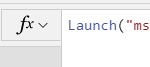
Open Document in Word App from Power Apps

And now when I click on the label, my document is opened within the Word desktop app.

Open Excel spreadsheets in the Desktop app

The same solution also works for spreadsheets:

Launch("ms-excel:ofe|u|" & ThisItem.'Link to item')

Handling the different file types

So if you now want to handle the different file types you could use code like this:

If(
    Last(
        Split(
            ThisItem.'File name with extension',
            "."
        )
    ).Result in [
        "docx",
        "doc"
    ],
    Launch("ms-word:ofe|u|" & ThisItem.'Link to item'),
    Last(
        Split(
            ThisItem.'File name with extension',
            "."
        )
    ).Result in [
        "xlsx",
        "xls"
    ],
    Launch("ms-excel:ofe|u|" & ThisItem.'Link to item')
)

Is your business still running on paper trails, sprawling Excel files, or ageing Access databases? There’s a better way — and I can show you exactly what it looks like. I’m the Technical Director of Vantage 365, a Microsoft solutions consultancy working with clients across the UK, the Netherlands, and worldwide. For over 30 years I’ve been turning messy, manual business processes into clean, automated systems that save time, reduce errors, and give teams the visibility they need to make better decisions. SharePains is not just any blog run by a Microsoft MVP. Have you ever used Try-Catch in Power Automate? The original post about Try-Catch in Power Automate can still be found on this site, https://staging.sharepains.com/2018/02/07/try-catch-finally-in-power-automate-flow/ Or have you ever used the Pieter’s method to avoid variables and speed up your flows? https://staging.sharepains.com/2020/03/11/pieters-method-for-advanced-in-flows/ You can contact me using contact@staging.sharepains.com

Tags:

24 responses to “Open Word documents in the desktop app from Power Apps”

  1. Heaven-Leigh Masters Avatar

    Hi! This seems to work when I do it manually from SharePoint. But I can’t get it to work within Power Automate and an Adaptive Card. Is that a limitation, or am I missing a trick for that?

    1. Pieter Veenstra Avatar

      That should all be the same. Can you check the uri that you are using?

  2. Ben Avatar
    Ben

    Can you launch them in the browser but as read view?

    1. Pieter Veenstra Avatar

      Hi Ben, without that msword prefix mentioned in the post documents will open in the online version. If you want them to be read only then I would use permissions on the files.

  3. Robert Andrew Wilson Avatar
    Robert Andrew Wilson

    Can this work with a hyperlink stored in a text field, which is linked to a document LIbrary?

    1. Pieter Veenstra Avatar

      Yes, it can be use to open a link. I often use it using the link to item property of a document in a library.

      1. Robert Andrew Wilson Avatar
        Robert Andrew Wilson

        pieter, silly question how can I do this. I am using a list to record all the meta data for a documents history (Approvals, rejections, revision history, etc.) this list is linked to a Power App, which has a linked workflow through which user upload documents into a specific library, and with this I create a hyperlink to the document. (This link cannot be clicked in edit mode – so I created a text label to allow me to do this. But the item opens online. This is really what I need to have open in the desktop app to allow reviewers to make minor amendments before it goes through an approval loop.

        I Tried the code above and couldn’t get it to work?

      2. Robert Andrew Wilson Avatar
        Robert Andrew Wilson

        Pieter – I can get the file to download from a link and open, BUT what I need is for the file to open from the Library in the desktop App so that the reviewers can perform minor edits without having to reupload the document, how can this be done – I can do this from a SharePpoint page list view, but I need to be able to do it within a Power App. I create a link through a workflow, submit an item to SharePoint and then update the list item data within the same power app later, when the link has been turned into an APP. At the moment I am using an html text box to create a clickable link within the App

  4. Sebastian Avatar
    Sebastian

    Hi
    Does this still work ?

    Launch(“ms-word:ofe|u|” & ThisItem.’Link to item’ );
    I have troubles to make it work.

    “Link to item” attribute returns link with an id at the end, which seems to make a problem for a Desktop Word to open.
    word opens some new file as read only not that one which is pointed.

    https://xxxxxxx.sharepoint.com/sites/documents-xxxx/xxxx/100%20folder/2022-document.docx?d=wa6f7fe68dcaf4199999fb5bff1c6f9f9

    When I use
    Launch(ThisItem.’Link to item’ );

    with browser version works as expected.

    Any suggestions ?

    1. Pieter Veenstra Avatar

      Hi Sebastian,

      Do you get any errors when the Launch is failing?

      1. Sebastian Avatar
        Sebastian

        Hi
        No error. It opens a Word, but the proper file is not open, only just some empty file.

        When I have provided a static value to Launch function (path + file without id) it works.

        Launch(“ms-word:ofe|u|” & “https://xxxxx.sharepoint.com/sites/documents-xxx/xxxxxx/100%20folder/word-file.docx”);

        Do you have any idea what could be wrong here ?

      2. Pieter Veenstra Avatar

        If without the id it works then you could do something like this:
        first(split(“https://xxxxx.sharepoint.com/sites/documents-xxx/xxxxxx/100%20folder/word-file.docx”,"?"))

      3. Sebastian Avatar
        Sebastian

        Hi
        Yes meanwhile I have done such like this.

        Just wondering what happened to origin call

        Set(varOfficeItem, First(Split(ThisItem.’Link to item’,”?d=”)).Result);
        Launch(“ms-word:ofe|u|” & varOfficeItem );

    2. Johan Nieuwhoff Avatar
      Johan Nieuwhoff

      Launch(“ms-word:ofv|u|” & First(Split(ThisItem.’link to item’;”?”)).Value fixed it for me.

  5. Giammarco Avatar
    Giammarco

    Hi Pieter, thank you for the guide, i have a question for you, is possible open PDF document in desktop app like this? Thank you in advance.

    1. Pieter Veenstra Avatar

      You could use browser settings to switch the document opening to the PDF applications as described in the below post:

      https://www.guidingtech.com/open-pdf-document-in-adobe-reader-instead-browser/

  6. Giammarco Avatar
    Giammarco

    Thanks for the reply, but the software is not for me, but for my company, im not the final user, there is some comand like “ms-word:ofe|u|” but for PDF?

    1. Pieter Veenstra Avatar

      I don’t think that that exists

  7. Danielle Avatar
    Danielle

    I am trying to open the Word document in a desktop app, when i use Launch(“ms-word:ofe|u|” & ThisItem.’Link to item’) I get the following error message: “Access denied. Contact your administrator” I am the owner of the document.
    When I use the document’s SharePoint link it works but it pulls up the original template and we need it to generate a version that people can edit without overriding the template.

    1. Pieter Veenstra Avatar

      That should be ok. Can you send me the full link. Feel free to send it on the chat rather than here in the comments.

  8. Jakeer Hussain B Avatar
    Jakeer Hussain B

    Hi Pieter,

    Thanks for the solution, it worked for Word files and Excel files, Can you give me expression for ,txt to open in notepad and PPTs to open in powerpoint?

    Thank you!

    1. Pieter Veenstra Avatar

      Hi Jakeer,

      The following link will give you some of the options available. I don’t think that notepad is an option available:

      https://learn.microsoft.com/en-us/office/client-developer/office-uri-schemes

  9. Susan Clark Avatar
    Susan Clark

    This is what worked for me – having a link in a gallery to open a doc in doc library – SharePoint:
    Launch(“ms-word:ofe|u|” & First(Split(ThisItem.’Link to item’,”?”)).Value)

    1. Richard P Avatar
      Richard P

      Yep this worked for me. The other original code Launch(“ms-word:ofe|u|” & ThisItem.’Link to item’) does not appear to work anymore. It opens an empty word document in read-only mode.

Leave a Reply

This site uses Akismet to reduce spam. Learn how your comment data is processed.