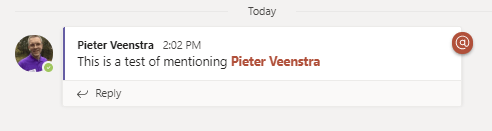
How to @mention someone in Microsoft Teams using Power Automate

@mention someone in Microsoft Teams with Power Automate

How to @mention someone in Microsoft Teams using Power Automate

By:

Date:

How many time have I seen people want to @mention someone in Microsoft Teams using Power Automate? Many Time!

Why to mention someone in Microsoft Teams

Ok, this is such a common scenario where you want to use Microsoft Teams to alert a person while your flow is running.

Quite a lot of consultancies for example organise stand-ups in Teams by sending a daily post to a team. Being able to alert people that the daily post is there can be quite important.

Or for example a long running flow does all sorts of things and then some people need to be alerted that the process is complete or that it has failed.

Running a flow to mention someone in Microsoft Teams

Today I noticed the Get @mention token for a user action. Why would this action exist if you can’t mention a person?
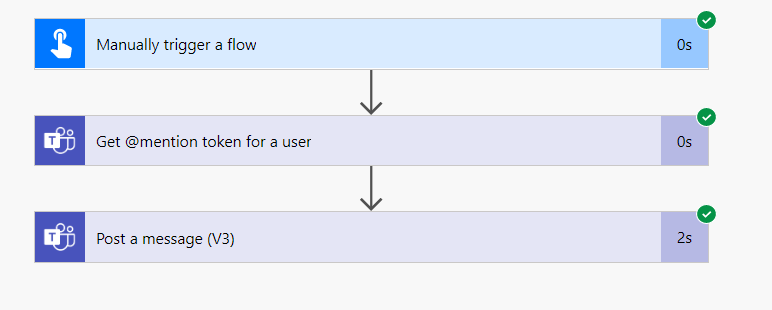
@mention in Power Automate

The development steps

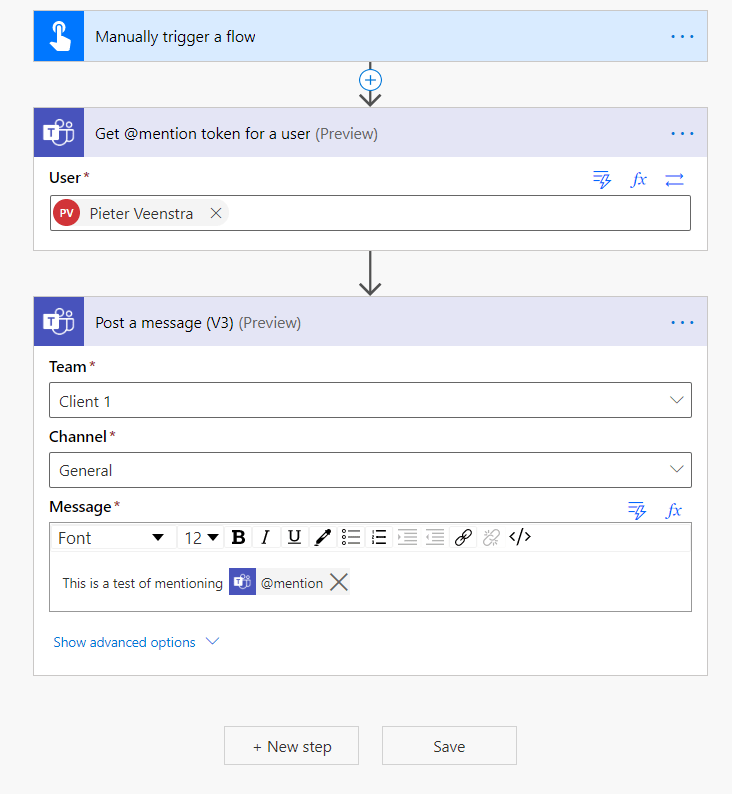
Well, it is as simple as selecting the action Get @mention token for a user and then select the user that you want to mention.
How to @mention someone in Microsoft Teams using Power Automate

Then use the Pots a message(V3) to post the action and use @mention from the dynamic content.

And that is it!

Advanced mode

It’s time for the bonus. Did you notice in the above screenshot the advanced mode option on the Get @mention token for a user action? The little icon with the two arrows.
How to @mention someone in Microsoft Teams using Power Automate

In advanced mode you can supply an email address for a user. I tried to see if I could put extra logic in their but that doesn’t seem to be possible yet.

This has been such a missing feature for so long that this is a great additional action to the Microsoft Teams connector in Power Automate. One of my posts from 2018 already mentioned the missing @mention feature but now it is there.

Is your business still running on paper trails, sprawling Excel files, or ageing Access databases? There’s a better way — and I can show you exactly what it looks like. I’m the Technical Director of Vantage 365, a Microsoft solutions consultancy working with clients across the UK, the Netherlands, and worldwide. For over 30 years I’ve been turning messy, manual business processes into clean, automated systems that save time, reduce errors, and give teams the visibility they need to make better decisions. SharePains is not just any blog run by a Microsoft MVP. Have you ever used Try-Catch in Power Automate? The original post about Try-Catch in Power Automate can still be found on this site, https://staging.sharepains.com/2018/02/07/try-catch-finally-in-power-automate-flow/ Or have you ever used the Pieter’s method to avoid variables and speed up your flows? https://staging.sharepains.com/2020/03/11/pieters-method-for-advanced-in-flows/ You can contact me using contact@staging.sharepains.com

26 responses to “How to @mention someone in Microsoft Teams using Power Automate”

  1. Ryan Robinson Avatar

    Thanks! I tried to do this a while ago and either it wasn’t available yet or I just missed it, but this is helpful.

    1. Pieter Veenstra Avatar

      Last week I was getting close to make this work through a MS Graph call, but i got stuck on the permission for Power Automate. From Graph explorer however it then already worked.

      So I’m assuming that this is using that API now. I’m quite sure that this has been introduced very recently.

  2. Xavier Donat Avatar
    Xavier Donat

    I was about to ask how to @mention someone in Microsoft Teams using Power Automate 🙂

    That’s exactly what I was looking for, worked like a charm.
    Thanks a lot.
    Xavier Donat

  3. Hannah Avatar
    Hannah

    Thanks a lot, this is very helpful. Have you found a way how to @mention a channel or even a team?

    1. Pieter Veenstra Avatar

      Hi Hannah, unfortunately not

  4. Ben Hullah Avatar
    Ben Hullah

    This works for me but the @mention doesn’t result in a notification in activity feed. Is anyone else seeing this?

    1. Pieter Veenstra Avatar

      Hi Ben,

      What do you notification settings look like? could it be that the notification is just delayed? Or does it work properly when you @Mention someone manually within the team app?

  5. Lennart Avatar
    Lennart

    Hi, sadly I can not see or select any user/member. What do I have to do to select specific user? Do you have any idea? 🙂
    Kind regards!

    1. Pieter Veenstra Avatar

      Hi Lennart,

      Sorry for the delay in responding. Your comment ended up in spam.

      Can you create a comment in Teams and then run a flow that collects that specific post from Teams. Then have a look in flow what the @mention for that user looks like and try to replicate that.

  6. Lynette Hare Avatar

    I am not able to select a user either. I made a comment but it still doesn’t select the user. Are you saying I have to create a different flow? So confused. It sounded pretty easy but isn’t.

    1. Pieter Veenstra Avatar

      Hi Lynette,

      Sorry for the delayed response. Your comment appeared in spam.

      Please feel free to start a chat and we can discuss to make this work for you.

  7. Harm Jan Avatar
    Harm Jan

    Hi Pieter,

    Can I also tag an entire Team, so everyone will be notified?

    1. Pieter Veenstra Avatar

      Hi Harm Jan,

      That option doesn’t exist within Power Automate yet.

  8. Mary Lynn Pontier Avatar
    Mary Lynn Pontier

    Very helpful. This works great for internal emails. It does not work for external guests in the Team, though, unless there is a workaround for that. Also wish i could @mention Teams, Channels and Tags!

    1. Pieter Veenstra Avatar

      Hi Mary Lynn,

      You can mention guest users, however you will have to supply the user id of the guest in the get @mention token.

      For Teams, Channels and Tags you are right.

  9. Eric Eaton Avatar
    Eric Eaton

    I have the same experience Mary Lynn had above. I can get this to work pretty easily for internal users, but it doesn’t work at all for guest users. It tells me “Resource does not exist or one of its queried reference-property objects are not present.” Is there a undocumented ‘secret handshake’ you found to make that work?

    1. Pieter Veenstra Avatar

      Hi Eric, when you use the user id of the guest user (a guid) it will work.

  10. Arjan Avatar
    Arjan

    How can I find the user id of a member of the team/channel

    1. Pieter Veenstra Avatar

      You will have to use the get @mention token action using their email address. You cannot do this for channels or teams.

  11. Niels Walet Avatar
    Niels Walet

    Interesting. Making my first hack of power automate, and this is what I need, but I can’t find the “double arrow” symbol anywhere. Am I missing something obvious?

    1. Pieter Veenstra Avatar

      Hi Niels, can you enabled the experimental features. You find this switch in the settings in Power Automate.

      1. Niels Walet Avatar
        Niels Walet

        Thanks Pieter, That gives me two out of three buttons, but not the double arrow one. I think I need some time to see what can be done here.

      2. Pieter Veenstra Avatar

        Hi Niels,

        I just tested it out and I’m not getting the advanced mode either anymore.

  12. Jean-Marie Berger Avatar
    Jean-Marie Berger

    I was successful using directly a valid email address in the User field of the Get token action.

  13. Nick Avatar
    Nick

    Is it possible to @ mention more than one user when posting a message?

    1. Pieter Veenstra Avatar

      Hi Nick,

      Yes you can, just use multiple get @mention token actions and then reference them in the post.

Leave a Reply

This site uses Akismet to reduce spam. Learn how your comment data is processed.