The file Document.docx is locked for shared use by user in SharePoint

The file Document.docx is locked for shared use by user in SharePoint

By:

Date:

It is time for a classic SharePain today.

Locked for shared use

You open a document in Office online and edit the document. Then you try to rename is and you get the following error message:

The file “Document.docx” is locked for shared use by username@tenant.onmicrosoft.com
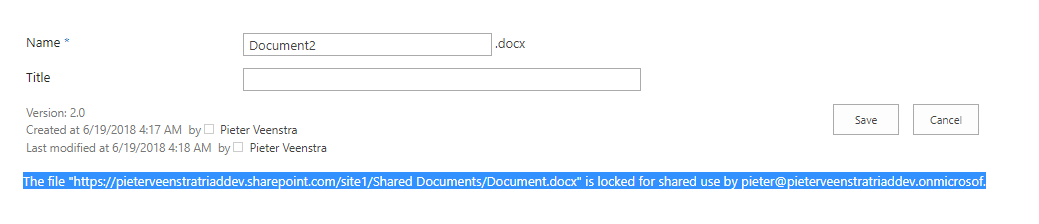
The file "Document.docx" is locked for shared use by username@tenant.onmicrosoft.com

I tried the same by renaming the file in the modern experience
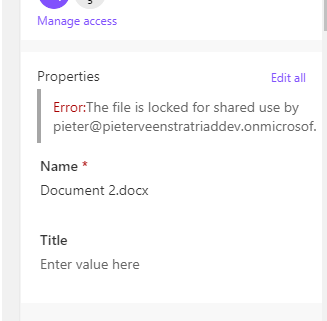
The file is locked for shared use by user


When you try to open the document in word things just disappear in a black hole and Word is never opened.
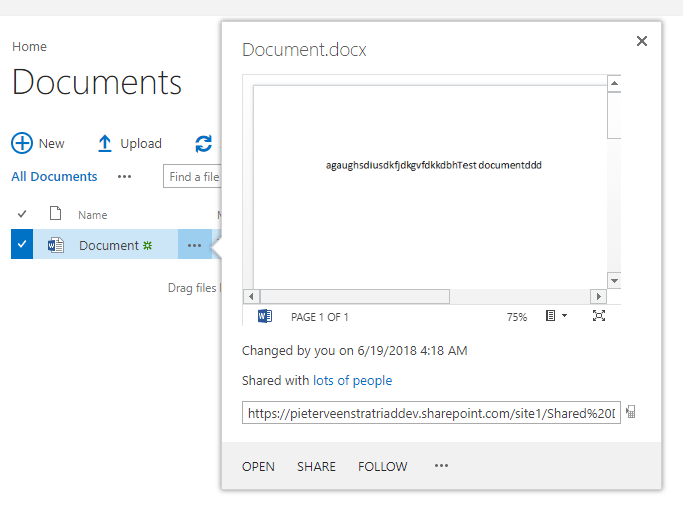
Showing a document in preview

After about 30 minutes my word suddenly opens the document as the lock seems to have expired now.

There seems to be an issue with document being locked when you open a document with Office Online

I haven’t got a real solution yet. If you do then please let me know. Otherwise watch this space as I’m still investigating.


Possible solution

Thanks to Olivier Collet for pointing out the following solutions on TechCommunity

  1. Make sure the “webclient service” on client side is running
  2. Find registry key: HKLM\SYSTEM\CurrentControlSet\Services\WebClient\Parameters on their machines.
  3. Find value: SupportLocking(if no, please add), set its value to 0, want to just disable lock feature.


Is your business still running on paper trails, sprawling Excel files, or ageing Access databases? There’s a better way — and I can show you exactly what it looks like. I’m the Technical Director of Vantage 365, a Microsoft solutions consultancy working with clients across the UK, the Netherlands, and worldwide. For over 30 years I’ve been turning messy, manual business processes into clean, automated systems that save time, reduce errors, and give teams the visibility they need to make better decisions. SharePains is not just any blog run by a Microsoft MVP. Have you ever used Try-Catch in Power Automate? The original post about Try-Catch in Power Automate can still be found on this site, https://staging.sharepains.com/2018/02/07/try-catch-finally-in-power-automate-flow/ Or have you ever used the Pieter’s method to avoid variables and speed up your flows? https://staging.sharepains.com/2020/03/11/pieters-method-for-advanced-in-flows/ You can contact me using contact@staging.sharepains.com

22 responses to “The file Document.docx is locked for shared use by user in SharePoint”

  1. noellawlor Avatar

    Hi Pieter, would something like this work for you (I haven’t tested)? http://kennekro.net/2017/12/file-is-locked-for-shared-use-by-user/ . I guess you could write a flow to trigger the script when you get such a message.

    1. Pieter Veenstra Avatar

      Hi Noel,
      That solution would only work in on-premises environments. I don’t think that the unlock is available within CSOM. Also I’m not sure if this is something that I could get end users to do every time they edit a document in Office Online.

  2. Andrew Jolly Avatar
    Andrew Jolly

    Saw this today on two different tenants.
    Once as a flow had finished doing its thing the other when I created a brand ne document online using the new button.

    Definitely a bug has surfaced here

    1. Pieter Veenstra Avatar

      In my case the library is a new one. No flows and no custom anything

  3. jeffangama Avatar

    It somestimes happened to me, re opening the doc in teams or word, then close docs & teams again, that fixed the issue

  4. sfennah Avatar

    When this happens I enforce checkout on the library so I can check out, edit and check in. Removing enforce check out on the library then leaves it all working as normal. This solution is ok in a training environment as its great for demonstrating the differences between libraries with and without enforced checkout but don’t think its a real world work around.

    1. Pieter Veenstra Avatar

      In your case does the document remain checked out? In my case the document is not checked out. It is just locked after it was edited in office online.

      1. sfennah Avatar

        Pieter, the document is not and never has been checked out, just locked as you described. When this happens I then enforce Check Out on the library and the document is not shown as checked out. I can check it out and edit. The action of enforcing check out on the library seems to force SharePoint Online to realise the document is not actually locked in any way.

        I normally see this on training courses when creating a new document in SharePoint Online and after closing the document try to edit the properties. So the document is brand new. It seems to take between 30 mins and 24hrs to release the lock for me, unless I change the library settings as described. However I’ve only found this check out solution on a course last week and it worked again this week – twice isn’t really proof of a solid solution.

  5. Rob Buckley Avatar
    Rob Buckley

    Same here – started on Friday. Logged a support request with MS but even though I’ve given then step by step screenshots of how the error is caused, they insist on remotely accessing my computer before they’ll try to fix it. Which given I’m on a Mac is causing them problems…

    The different in my case is that I’m able to edit and view files, despite the lock, just not rename them, delete them, etc

    1. Pieter Veenstra Avatar

      I have the feeling that it is getting worse. Any document created in office online cannot be edited within the next 30 minutes ot so

  6. rfjschouten Avatar

    Hi Peter, I had similar problems like you describe. When we click new document on a library and it opens it in Office Online, you rename the document and afterwards would like to set some required meta data in the library itself, we get same error message that document is locked by yourself. We managed to ‘fix’ this by setting the following attributes on the library trough PnP provisioning: EnableVersioning=”true” EnableMinorVersions=”true” MinorVersionLimit=”100″ MaxVersionLimit=”500″ DraftVersionVisibility=”0″. Setting these options doesn’t lock the file anymore.

    Maybe this will give you some new insights or help you out.

    1. Pieter Veenstra Avatar

      Hi Robert, I think that that is similar to Sara’s comments. I have the feeling that something has changed to the out of the box library or Office Online is not able to deal with out of the box settings. Either way this should be fixed.

      I’ve reported this to Microsoft on twitter, but I’m still waiting for them to resolve the issue. I’m hesitant changing out of the box library settings as a workaround.
      https://twitter.com/PieterVeenstra/status/1009037750543233024

      I wonder if this is related to the changes currently made to document libraries and Office Online is assuming new settings.

  7. Sigge Avatar
    Sigge

    Hi,
    we have about 100 users who work’s online in SharePoint libraries. Many of us has this locked problems, even me admin. We have a case and Microsoft India is working on this huge problem.
    When a user open a document, edit it=locked by himself
    He can’t rename, delete, move or copy it for about 1-24 h
    When you open it in desktop Word, you can see that is locked by myself, sometimes 2, 3 or more instances of the same user or other users.
    It is a huge issue for us in our organisation and we need help NOW. Users are frustrating, and Microsoft tells us every second day to wait, “we are working on a solution”…..

  8. Sigge Avatar
    Sigge

    MS SharePoint Online Team have finally updated the new version of SQL Tables and modified release times in the code(error 500 via https request).
    Info:
    HTTP/1.1 423 Locked
    Cache-Control: private, max-age=0
    Transfer-Encoding: chunked
    Strict-Transport-Security: max-age=31536000
    X-FRAME-OPTIONS: SAMEORIGIN
    X-Powered-By: ASP.NET
    MicrosoftSharePointTeamServices: 16.0.0.7806
    X-Content-Type-Options: nosniff
    X-MS-InvokeApp: 1; RequireReadOnly

    We have tested our SharePoint libraries via different users and verified Connection to SharePoint Online via software Fiddler Web Debugger.

    Everything seems OK, all users can copy, rename, move, edit same file over again also…

  9. Francis Avatar
    Francis

    Peter:

    Did you ever resolve this? This happened to me with a document last month. A month passed, and I still cannot rename the document because it is “locked by another user” but the other user’s email address is my own.

    1. Pieter Veenstra Avatar

      Hi Francis,
      I found that when the locks last longer than a day that there were often background processes ( like Flow, SharePoint Workflows, PowerShell or anything else locking the files). i would be interested to see the version history on this document that is locked. Are you able to email that to me?

  10. Per Jarlemark Avatar

    Have seen this a lot lately I’m multiple tenants.
    Did you ever had a soloution to this?

    1. Pieter Veenstra Avatar

      Hi Per,
      I am suspecting background processes or forgotten locks but I havent been able to find an cause for it. Badly designed Flows or PowerShell script can cause these problems.
      Do you have any background processes running?

  11. Olivier Collet Avatar
    Olivier Collet

    Hi, a similar post speaks of the same problem https://techcommunity.microsoft.com/t5/SharePoint/Cannot-Release-Lock-on-SharePoint-Online-File/td-p/59694

    you have to change a registry key and it worked for me

    1. Pieter Veenstra Avatar

      Thanks Olivier I will add that solution to my post.

  12. Jesse (@j_es_se_) Avatar

    Removing their permissions to the file, library, or site works, however it does take a little time for the security to trigger the lock release.

    1. Pieter Veenstra Avatar

      How about if the file wasn’t saved yet? Would taking permissions away then not cause some harm?

Leave a Reply

This site uses Akismet to reduce spam. Learn how your comment data is processed.