Quite a common requirements for Microsoft Flow is to use a multi-people field to create a single event in a calendar or a single email.
The poor way
You will probably start by creating a SharePoint list with a people field that can hold multiple people.
Then you create a flow that triggers on the creation of an item in this list. Then you add a create event action in the Flow and you end up with a flow like this:

That’s not nice. Flow has now added a Apply to each step. this then results into multiple events being created.
How do we solve this one?
I’m starting this by initialising 3 variables.
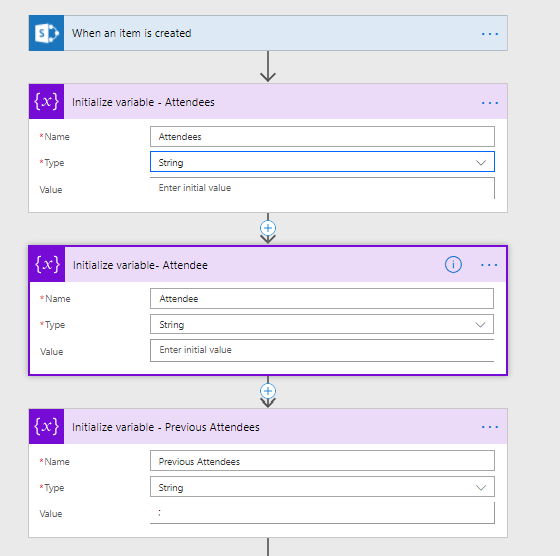
Now I’m setting 3 variables :
- Attendee – is a copy of my email field. Although not really needed it does help when you debug the flow to have this available within the run history output
- Attendees – The list of attendees that the flow is building up. this will be used for the create event action
- Previous Attendees – This is a variable to store the values in temporarily as the set variablee doesn’t like to use the same variable to set and to reference within its new value.
Again an Apply to each will appear, but this time I’m happy with that as I can now concatenate the attendees into a single string. It would be nice to just use 2 variables but it isn’t possible to assign a value to a variable using the value of the variable itself.

The concat function looks like this
concat(variables(‘Previous Attendees’),’;’,items(‘Apply_to_each’)?[‘Email’])
concat(variables(‘Previous Attendees’),’;’,variables(‘Attendee’))
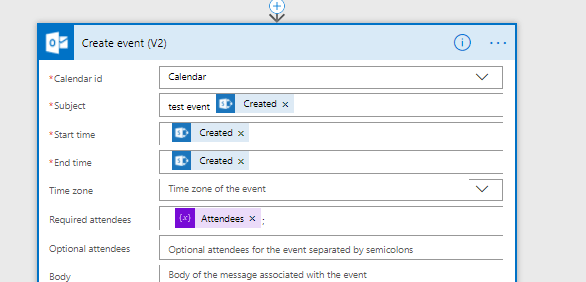
Then finally I adjust the required attendees in my event by using by attendees variable and all works as I wanted:
The better way
To create a semicolon separated list of email addresses from a people field you can also follow a better pattern.
First use a Seelct action and feed it with the People field in your SharePoint list.
Then use a compose action and set this to:
join(body('Select'),';')You will now have a flow that looks like this:

Pieter Veenstra

Is your business still running on paper trails, sprawling Excel files, or ageing Access databases? There’s a better way — and I can show you exactly what it looks like. I’m the Technical Director of Vantage 365, a Microsoft solutions consultancy working with clients across the UK, the Netherlands, and worldwide. For over 30 years I’ve been turning messy, manual business processes into clean, automated systems that save time, reduce errors, and give teams the visibility they need to make better decisions. SharePains is not just any blog run by a Microsoft MVP. Have you ever used Try-Catch in Power Automate? The original post about Try-Catch in Power Automate can still be found on this site, https://staging.sharepains.com/2018/02/07/try-catch-finally-in-power-automate-flow/ Or have you ever used the Pieter’s method to avoid variables and speed up your flows? https://staging.sharepains.com/2020/03/11/pieters-method-for-advanced-in-flows/ You can contact me using contact@staging.sharepains.com


Leave a Reply
You must be logged in to post a comment.